
log_reuse_wait_desc in sys.databases before you shrink anything or change a recovery model. Three of the thirteen values account for almost every real case.The Log Will Not Truncate and the Backups Are Running
A transaction log is filling a disk, or it has stopped shrinking, and the backup job says it succeeded. Before touching anything, ask SQL Server why it will not reuse the space. It already knows, and it will tell you in one column.
SELECT
    name,
    recovery_model_desc,
    log_reuse_wait_desc
FROM sys.databases
WHERE state_desc = 'ONLINE'
ORDER BY CASE WHEN log_reuse_wait_desc = 'NOTHING' THEN 1 ELSE 0 END, name;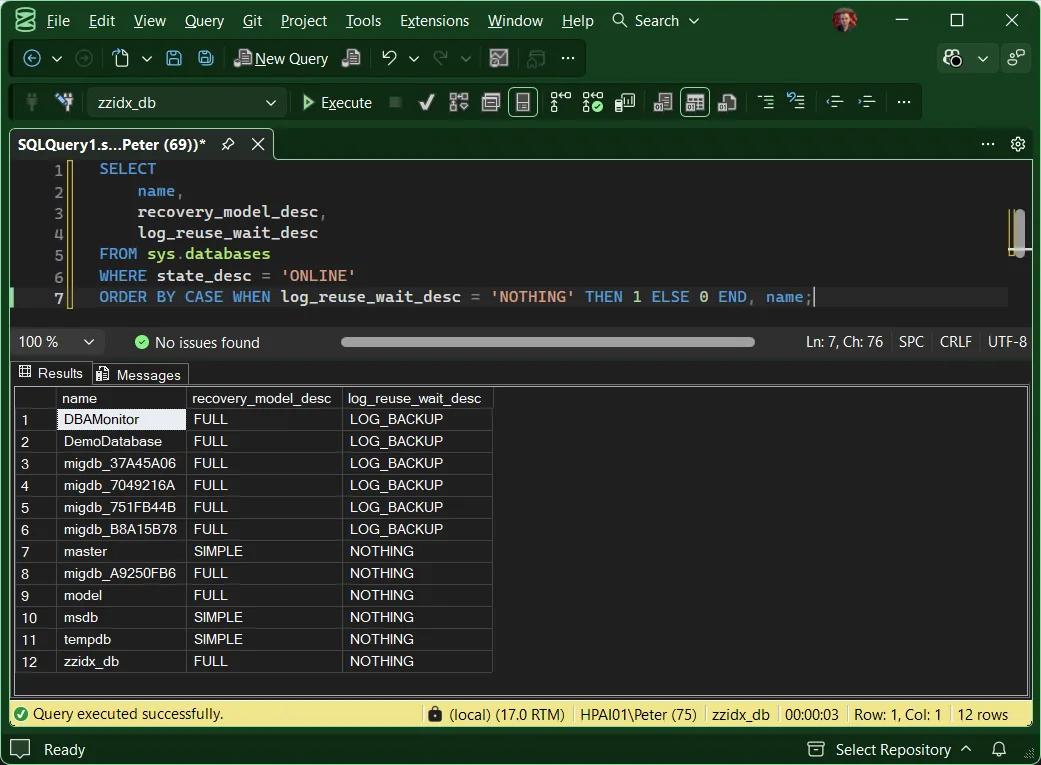
That column is log_reuse_wait_desc. It is the single most useful thing in
sys.databases during a log incident, because it turns
“the log is full” into a specific, named reason with a specific fix. Everything else
in this post is what the values mean.
Reading It On A Real Instance
Output from the lab, using Get-LogReuseWaits, which adds recovery model, log size and last log backup beside the reason:
database_name    recovery_model  log_reuse_wait  log_size_mb  last_log_backup          status
---------------  --------------  --------------  -----------  -----------------------  --------------------------
DBAMonitor       FULL            LOG_BACKUP            584.0  NULL                     ACTION: take a log backup
DemoDatabase     FULL            LOG_BACKUP            512.0  2026-07-28 08:00:02.000  ACTION: take a log backup
migdb_37A45A06   FULL            LOG_BACKUP            160.0  2026-07-28 08:00:02.000  ACTION: take a log backup
migdb_7049216A   FULL            LOG_BACKUP            160.0  2026-07-28 08:00:02.000  ACTION: take a log backup
migdb_751FB44B   FULL            LOG_BACKUP            160.0  2026-07-28 08:00:02.000  ACTION: take a log backup
migdb_B8A15B78   FULL            LOG_BACKUP            160.0  2026-07-28 08:00:03.000  ACTION: take a log backup
migdb_A9250FB6   FULL            NOTHING               160.0  2026-07-28 08:00:02.000  OK
zzidx_db         FULL            NOTHING                72.0  NULL                     OK
Six databases in FULL recovery waiting on a log backup, and a last log backup 35 days old. That is not six problems. It is one missing job, and the column found it in a second.
Every Value, And What To Do About It
Microsoft documents thirteen values. Three of them account for almost every real incident, so those get the detail:
LOG_BACKUPACTIVE_TRANSACTIONDBCC OPENTRAN, then sys.dm_tran_database_transactions. Find the session and deal with the transaction. Killing it is a decision, not a reflex.AVAILABILITY_REPLICAThe Rarer Values
You are unlikely to meet these, and most clear on their own. They are here so that a value you have never seen does not turn into an investigation.
NOTHINGandCHECKPOINT, healthy. If the file is still enormous, that is a sizing question, not a truncation one.ACTIVE_BACKUP_OR_RESTORE, a data backup or restore is running. Self-clearing, and only a problem when a full backup takes hours.REPLICATION, transactions not yet delivered to the distributor. Change data capture counts here too. Check the Log Reader Agent is alive, because a dead one grows the log without limit.DATABASE_MIRRORING, the mirror is paused or a long way behind. Increasingly rare, since mirroring is deprecated.DATABASE_SNAPSHOT_CREATION, a snapshot is being created. Worth knowing thatDBCC CHECKDBbuilds an internal one, so this can appear during a routine integrity check.LOG_SCAN, something is reading the log. Routine and normally brief.OLDEST_PAGE, indirect checkpoints are on and the oldest dirty page predates the checkpoint LSN. More visible than it used to be, because indirect checkpoint is the default for databases created on SQL Server 2016 and later.XTP_CHECKPOINT, an In-Memory OLTP checkpoint is needed. Only relevant with a memory-optimized filegroup, where Microsoft says to expect this orCHECKPOINTas normal.SLOG_SCAN, Accelerated Database Recovery is scanning its secondary log stream. SQL Server 2019 and later, and the value the documentation covers worst, see below.
Microsoft’s Own Two Pages Disagree
Worth knowing before you go looking things up mid-incident, because it will waste your time
otherwise. The sys.databases reference lists thirteen
values and points you at
the transaction log page for
“more detailed explanations”. That second page does not cover
SLOG_SCAN at all, and it lists a value called OTHER_TRANSIENT that the
first page does not.
So the page with the fullest explanations is missing the newest value, and the two pages disagree about a string. Neither is wrong exactly, they were updated at different times. If you land on the transaction log page and cannot find your value, that is why.
Frequently Asked Questions
My log is still huge after I fixed the wait. Why?
Because truncation and shrinking are different things. Truncation frees space inside the file for reuse. It never makes the file smaller on disk. Microsoft puts it plainly: “Shrinking a log file alone can’t solve the problem of a full log file. Instead, you must discover why the log file is full and can’t be truncated.” Fix the reason first, then decide whether the file is genuinely the wrong size.
I took a log backup and it still says LOG_BACKUP.
If that log had never been backed up before, that is expected. Microsoft: “If the log has never been backed up, you must create two log backups to permit the Database Engine to truncate the log to the point of the last backup.” Take a second one. If it persists past that, re-run the query, because the reason has probably changed to something else.
Can this bite me in SIMPLE recovery?
Yes, and this is the most common misunderstanding on the topic. SIMPLE means you cannot take log backups, so LOG_BACKUP will never appear. It does not mean the log cannot fill. ACTIVE_TRANSACTION stops truncation under every recovery model, so one forgotten open transaction will grow a SIMPLE database’s log until the disk does.
Why does my value not appear in Microsoft’s list?
Ids 10, 11 and 12 are documented only as “For internal use only” with no published description, and they are expected to be rare and short-lived. If you catch one, re-query rather than investigate. Anything else is worth reporting, because the documented set is small and stable.
Is there an official query for this?
Not a short one. The sys.databases reference page has three examples and none of them touch this column. What Microsoft does publish is a roughly 150 line diagnostic script, and it lives on the error 9002 troubleshooting page, not on the catalog view page. The three-column query above is the version you can actually remember at 2am.
Related
- Get Log Reuse Waits, the script behind the output above
- Disk Is Full or the Log Will Not Truncate, the router that gets you to this column in three checks
- SQL Server transaction log full (error 9002), when it has already filled
- Recovery models explained, if
LOG_BACKUPwas a surprise - Get VLF Counts, for a log that is fragmented rather than full
- Storage & Capacity, the pillar this sits in
Summary
When a log will not truncate, SQL Server already knows why and stores the answer in
log_reuse_wait_desc. Read that column before you shrink anything, change a recovery
model, or add a file. Three values cover almost every case: a missing log backup, an open
transaction, or a secondary replica that has not caught up. The rest are mostly routine and
clear on their own.
Leave a Reply