
INSERT ... EXEC, where the procedure decides the shape and your table has to match it exactly.A short message with no detail: no column name, no counts, nothing to work from. Which of the 4 causes below you have is usually obvious once you know they exist.
The Straightforward Cause
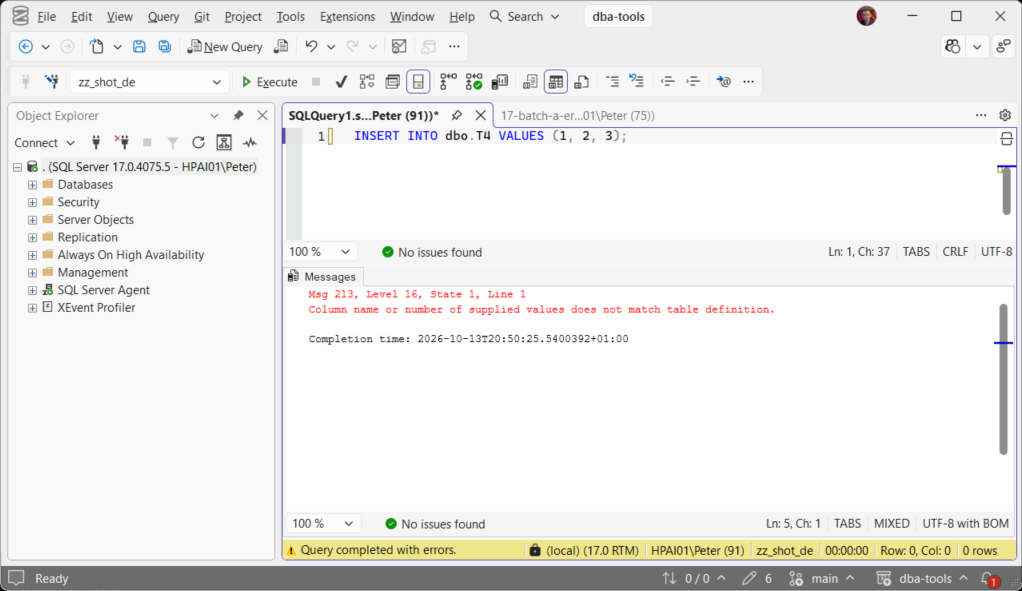
An INSERT with no column list has to supply every column, in order:
CREATE TABLE dbo.T4 (a int, b int, c int, d int);

INSERT INTO dbo.T4 VALUES (1, 2, 3);   -- Msg 213, four columns and three values
Naming the columns fixes it and is worth doing everywhere, because it also survives someone adding a column to the table later:
INSERT INTO dbo.T4 (a, b, c) VALUES (1, 2, 3); -- fine, d takes its default or NULLThat is the real argument for column lists. A bare INSERT ... VALUES is a promise about the table’s shape that quietly breaks the next time the table changes.
The INSERT … EXEC Cause
This is where most 213s come from in DBA scripts. Capturing a procedure’s output requires a table with exactly the procedure’s result set: same number of columns, same order, compatible types.
CREATE PROCEDURE dbo.usp_Three AS SELECT 1 AS a, 2 AS b, 3 AS c;
GO

CREATE TABLE dbo.TwoCols (a int, b int);

INSERT INTO dbo.TwoCols EXEC dbo.usp_Three;          -- Msg 213
INSERT INTO dbo.TwoCols (a, b) EXEC dbo.usp_Three;   -- Msg 213, naming them does not help
Naming the columns does not rescue this one. Verified on SQL Server 2025: both forms fail identically. With INSERT ... EXEC the procedure decides the shape and the table has to match it, so a column list is not a filter. The error does tell you which case you have: the static insert is State 1, the INSERT ... EXEC form is State 7 and names the procedure.
Which makes system procedures a common source, because their result sets change between versions and are not always what you remember. sp_who2 is the classic: it returns 13 columns and SPID appears twice, at both ends of the row. Miss that and you get a 213 that looks like a bug in your script.
THE ONE WORTH KNOWING: TRY/CATCH Will Not Save You
This surprises people, and it is easy to prove. A static INSERT with the wrong column count is not caught by TRY/CATCH:
BEGIN TRY
    INSERT INTO dbo.T4 VALUES (1, 2, 3);
    SELECT 'this never runs';
END TRY
BEGIN CATCH
    SELECT 'and neither does this';
END CATCH
Tested on SQL Server 2025: the CATCH block never ran, the error surfaced as a raw Msg 213, and the batch was aborted. The reason is that this is a compile-time failure. The whole batch is compiled before any of it executes, so the statement never runs and there is no runtime error for CATCH to catch.
The same statement compiled separately is catchable, which is the workaround when you genuinely need to handle it:
BEGIN TRY
    EXEC sp_executesql N'INSERT INTO dbo.T4 VALUES (1, 2, 3);';
END TRY
BEGIN CATCH
    SELECT ERROR_NUMBER() AS err;   -- 213, caught, because it compiled separately
END CATCH
And INSERT ... EXEC is caught too, because that shape check happens at run time rather than compile time. Verified: of the 3 forms, only the static one escaped the CATCH.
Nothing partially inserts in any of them. Both target tables held zero rows afterwards.
The Cause That Appears Overnight
Code that worked yesterday starts failing because the table changed. A bare INSERT ... SELECT * is the usual victim:
INSERT INTO dbo.TwoCols SELECT * FROM dbo.Orders; -- Msg 213 once Orders gains a columnNothing in the statement is wrong. Someone added a column to Orders, and SELECT * faithfully brought it along. Name the columns on both sides and this class of failure disappears:
INSERT INTO dbo.TwoCols (a, b) SELECT a, b FROM dbo.Orders;To see what changed, compare the two shapes directly:
SELECT  c.name, c.column_id, TYPE_NAME(c.user_type_id) AS data_type, c.is_nullable
FROM    sys.columns c
WHERE   c.object_id = OBJECT_ID('dbo.Orders')
ORDER BY c.column_id;
Microsoft’s reference covers INSERT and sys.columns in full.
Frequently Asked Questions
Why does the message not tell me which column?
sys.columns for the table and the mismatch is usually obvious.My INSERT … EXEC used to work and now it does not.
Can I make INSERT … EXEC ignore the extra columns?
Why did TRY/CATCH not catch this?
INSERT with the wrong column count fails at compile time, before the batch runs, so there is no runtime error to catch and the batch aborts. Verified on SQL Server 2025. Wrap it in sp_executesql and it compiles separately, at which point it is catchable.Does an identity column count?
INSERT ... VALUES skips the identity column and expects a value for every other column; measured on SQL Server 2025, and the INSERT reference says the next identity value is simply used. Supply a value for it and you get Msg 8101, not 213. Where identity does bite is the count: a table of identity plus 2 columns given 1 value is still a 213. Name your columns and neither problem arises.Where To Go Next
- Log and Filter sp_who2 Results, the INSERT … EXEC case, worked through end to end
- Get Schema Change History, which table changed shape overnight, who changed it and when, from the default trace
- Incorrect Syntax Near (Error 102), the other compile-time stopper
- SQL Server Errors: The Complete Guide, the rest of the library
Leave a Reply