
Where Compression Actually Pays Off
Row and page compression trade CPU for storage and I/O, and that trade is worth making on some tables and not others. The biggest, least-frequently-updated tables are usually the best candidates: maximum space and I/O savings, minimal CPU cost relative to the table’s overall activity. A small, heavily-written table is usually the wrong place to start.
This script finds the candidates worth evaluating first: the largest uncompressed heaps and clustered indexes in the current database, ordered by reserved space.
Why Compression Candidates Matter
- Compression’s benefit scales with size, the biggest uncompressed tables are where the same percentage saving translates to the most actual space and I/O reduction
- Compression isn’t free, it costs CPU on every read and write, applying it to a small or heavily-written table can cost more than it saves
data_compression_desc = 'NONE'filters to genuinely uncompressed objects, so the list is already the actual opportunity, not a general size report- Row count alongside size tells you whether a table is wide-and-sparse or narrow-and-dense, which affects whether row or page compression is the better fit
When to Run This Script
- Capacity planning conversations, to identify where compression could meaningfully reduce storage footprint
- Before a storage or backup-window conversation, since compressed data also means smaller backups
- Routine health checks on databases known to be storage-constrained
- After a large data load, to see whether the newly-loaded table is a good compression candidate before it grows further
The Script
Run against the target database (-Database <dbname>).
- Tested on: SQL Server 2025 (RTM CU8), Windows lab instance
- Last verified: 2026-09-08 (saved output from a real run, Get-CompressionCandidates-20260908-014659.csv)
- Permissions: VIEW DATABASE STATE
- Safety: read-only, impact low
/*
Script Name : Get-CompressionCandidates
Category    : monitoring
Purpose     : Largest uncompressed tables and heaps in the current database, ordered by reserved space — identifies the best candidates for row or page compression.
Author      : Peter Whyte (https://sqldba.blog/dba-scripts-get-compression-candidates/)
Requires    : VIEW DATABASE STATE
*/
-- SAFE:ReadOnly
-- IMPACT:Low
-- SCOPE:CurrentDatabase
SET NOCOUNT ON;

SELECT
    s.name AS schema_name,
    t.name AS table_name,
    i.type_desc AS index_type,
    p.data_compression_desc AS current_compression,
    CAST(SUM(ps.reserved_page_count) * 8.0 / 1024 AS DECIMAL(10,2)) AS reserved_mb,
    CAST(SUM(ps.used_page_count) * 8.0 / 1024 AS DECIMAL(10,2)) AS used_mb,
    SUM(ps.row_count) AS row_count,
    COUNT(DISTINCT p.partition_number) AS partition_count
FROM sys.tables t
JOIN sys.schemas s ON s.schema_id = t.schema_id
JOIN sys.indexes i ON i.object_id = t.object_id
                            AND i.type IN (0, 1) /* heaps (0) and clustered indexes (1) only */
JOIN sys.partitions p ON p.object_id = i.object_id
                            AND p.index_id = i.index_id
JOIN sys.dm_db_partition_stats ps
                            ON ps.object_id = t.object_id
                            AND ps.index_id = i.index_id
                            AND ps.partition_number = p.partition_number
WHERE p.data_compression_desc = 'NONE'
GROUP BY s.name, t.name, i.type_desc, p.data_compression_desc
ORDER BY reserved_mb DESC;
Filtering to i.type IN (0, 1) (heaps and clustered indexes only) is deliberate, that’s where a table’s actual row data lives, compressing the clustered index or heap is where the real storage saving happens.
How To Run From The Repo
Clone DBA Tools, initialize and run the script against your target database:
# Clone dba-tools repo:
git clone https://github.com/peterwhyte-lgtm/dba-tools

# Initialize environment:
cd dba-tools
.\Initialize-Environment.ps1

# Largest uncompressed tables in the current database:
.\run.ps1 Get-CompressionCandidates -Database YourDatabase

# To run against a remote sql server:
.\run.ps1 Get-CompressionCandidates -ServerInstance SQLSERVER01 -Database YourDatabase
This script lives in the repo at:
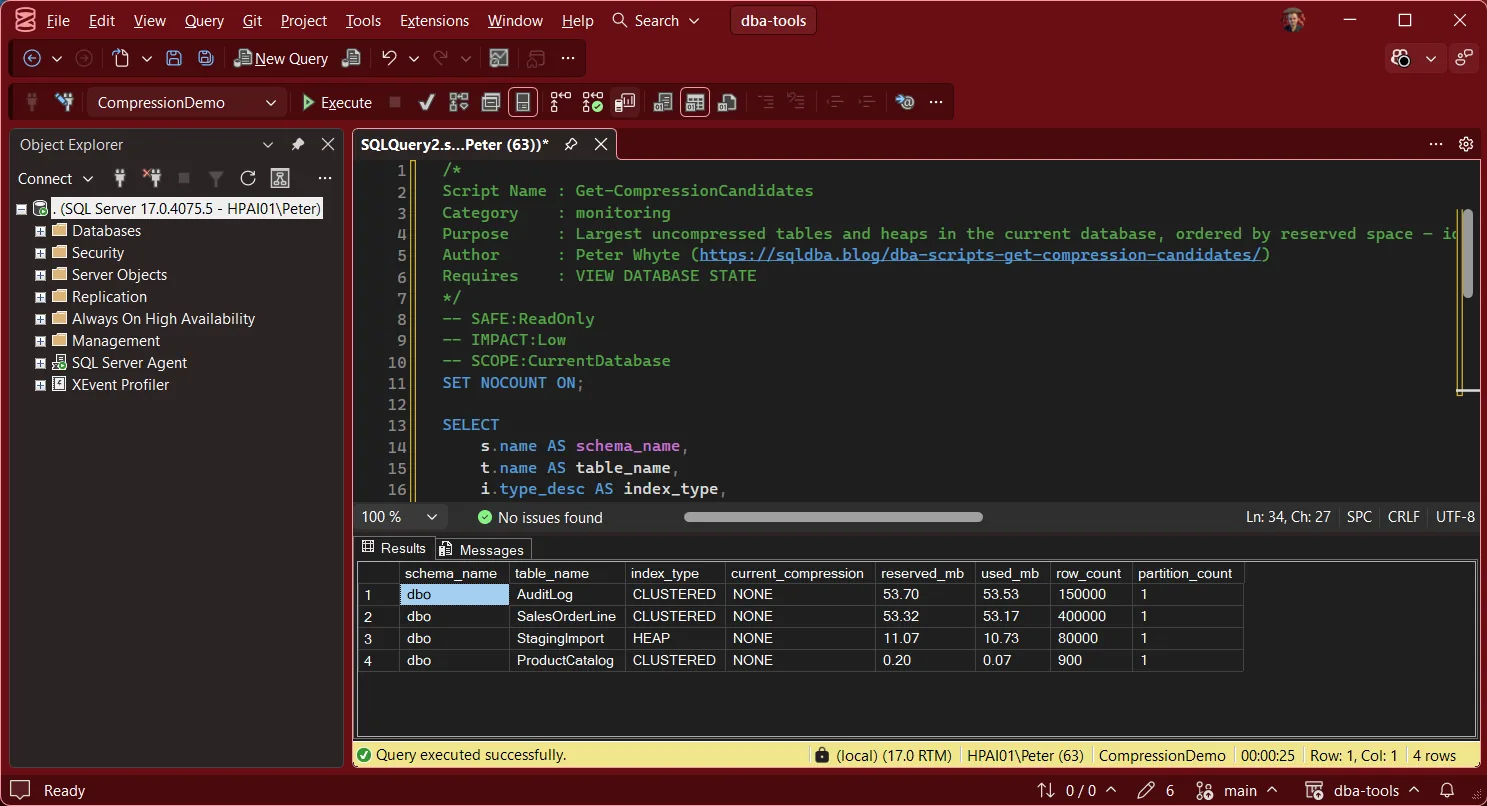
Example Output
Run it in the database you are sizing. Against master it returns only a handful of tiny system tables.
Understanding the Results
schema_nametable_nameindex_typecurrent_compressionreserved_mbused_mbrow_countpartition_countBest Practices
- Start with the largest, least-frequently-updated tables, that’s where the space and I/O savings outweigh the CPU cost most reliably
- Test compression on a non-production copy first when possible, actual CPU impact depends heavily on data patterns and workload, not just table size
- For partitioned tables, compress older, colder partitions first rather than the whole table, this gets most of the benefit with the least write-path risk
- Re-run periodically, tables grow, and a table that wasn’t worth compressing last quarter might be now
Microsoft’s reference covers sys.tables, sys.indexes and sys.partitions in full.
Frequently Asked Questions
Should I always compress the largest table on the list?
Usually a strong first candidate, but check its write pattern first. A large table that’s also under heavy, constant write load will feel the CPU cost of compression more than a large, mostly-read table. Size alone points at the opportunity; workload pattern confirms whether it’s the right one to act on first.
Row compression or page compression, which should I pick?
Row compression is the lighter-weight, lower-risk default, it compresses fixed-length data types and reduces per-row overhead. Page compression goes further, also compressing repeated values across rows on a page, generally better for wide tables with repetitive data, but with a higher CPU cost. Test both against a real workload before committing.
Summary
Compression pays off most on the biggest, coldest tables, and this script finds exactly those candidates in one pass: every uncompressed heap and clustered index in the current database, ordered by reserved space. The top of the list is almost always the right place to start evaluating.
Run it during any capacity planning conversation, and treat the largest uncompressed table as the natural first candidate to test, not a decision to make on size alone without checking its write pattern first.
Related Scripts
You may also find these scripts useful:
- Index Maintenance (hub)
- Table Sizes
- DBA Scripts: The Complete Guide, the map across every script on this site
Leave a Reply