
You may see this error when trying to access a database during or after a restore:
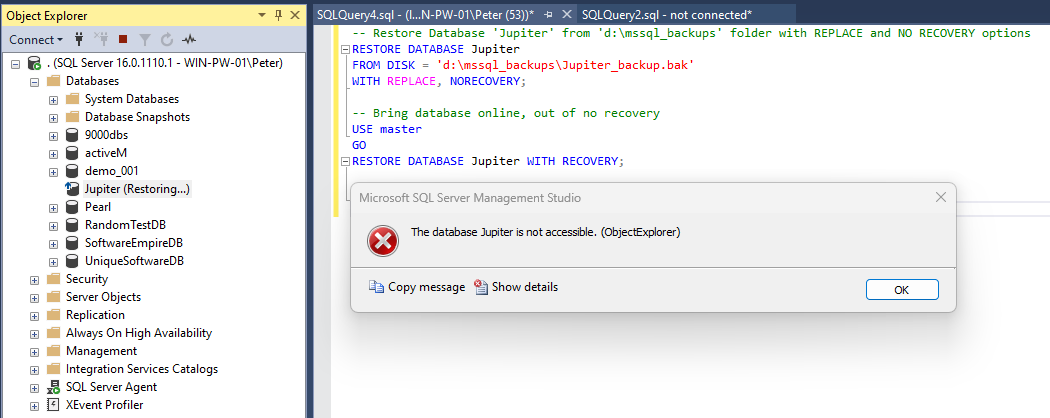
It is easy to misread this during an incident. It does not mean corruption, and it does not mean the restore failed. The database is in the RESTORING state, and while it is there most operations fail, including queries, schema changes and drops.
The question that actually matters is whether a restore is genuinely running, or whether one finished badly and left the database behind. Those two look identical from the error message and need opposite responses.
First: Is a Restore Actually Running?
Do not touch anything until you know. Killing a live restore is how a bad hour becomes a bad week.
SELECT  r.session_id,
        r.command,
        r.percent_complete,
        r.start_time,
        DATEADD(SECOND, r.estimated_completion_time / 1000, GETDATE()) AS estimated_finish,
        DB_NAME(r.database_id) AS database_name,
        s.login_name,
        s.program_name
FROM    sys.dm_exec_requests r
LEFT JOIN sys.dm_exec_sessions s ON s.session_id = r.session_id
WHERE   r.command IN ('RESTORE DATABASE', 'RESTORE LOG', 'BACKUP DATABASE', 'BACKUP LOG');
A row here means leave it alone. Large restores sit at a low percentage for a long time during file initialisation, so slow progress is not the same as stuck. If the query returns nothing, no restore is running and the database has been left behind.
Why a Database Gets Stranded in RESTORING
SELECT name, state_desc, recovery_model_desc
FROM   sys.databases
WHERE  name = N'YourDb';
The usual causes, in the order they actually turn up:
- The restore used
WITH NORECOVERYand nothing followed. By far the most common. The database is deliberately left ready for more log backups, and the job or person meant to apply them stopped. - A log shipping secondary. These live in RESTORING or STANDBY permanently and by design. Do not “fix” one. Recovering it breaks log shipping and you will be reseeding from a full backup.
- An availability group secondary. Also RESTORING by design, also normal.
- The restore genuinely failed, out of disk, lost the path to the backup, or the service restarted mid-restore.
Check the middle two before doing anything. A stranded database and a working log shipping secondary look identical in sys.databases.
Bring the Database Online
If it is a genuine leftover and there are no further backups to apply:
RESTORE DATABASE [YourDb] WITH RECOVERY;This is a one-way door. Once recovered, the database will not accept further log backups, so if there were logs still to apply you would be restoring from scratch.
If there are more logs to apply, apply them and recover on the last one:
RESTORE LOG [YourDb] FROM DISK = N'D:\Backups\YourDb_log_2.trn' WITH NORECOVERY;
RESTORE LOG [YourDb] FROM DISK = N'D:\Backups\YourDb_log_3.trn' WITH RECOVERY;   -- the last one
Working Out What Was Already Restored
If you inherited the situation and do not know how far it got, msdb remembers:
SELECT TOP 20
       rh.destination_database_name,
       rh.restore_date,
       rh.restore_type,          -- D = full, I = differential, L = log
       bs.backup_finish_date,
       bs.first_lsn,
       bs.last_lsn,
       bmf.physical_device_name
FROM   msdb.dbo.restorehistory rh
JOIN   msdb.dbo.backupset bs          ON bs.backup_set_id = rh.backup_set_id
JOIN   msdb.dbo.backupmediafamily bmf ON bmf.media_set_id = bs.media_set_id
WHERE  rh.destination_database_name = N'YourDb'
ORDER  BY rh.restore_date DESC;
The last_lsn of the most recent restore tells you which log backup has to come next. Any log backup whose first_lsn is higher leaves a gap, and the restore will refuse it.
Other Situations You Will Hit
You Need to Drop the Database Instead
A database in RESTORING will not drop cleanly while a restore is active. Confirm nothing is running with the first query, then drop it as normal. If it is a log shipping secondary, remove the log shipping configuration first or it will simply be recreated.
Recovery Itself Fails
Occasionally WITH RECOVERY will not complete, and the error log holds the reason:
EXEC xp_readerrorlog 0, 1, N'YourDb', NULL, NULL, NULL, N'DESC';There are two common answers. Out of disk space, because recovery needs room to roll forward and back, and a missing or corrupt backup file part way through the chain. Neither is fixed by running the command again.
Stopping It Recurring
- Make the last step of every restore script explicit. Most stranded databases come from a chain where the final
WITH RECOVERYwas never run. - Alert on databases sitting in RESTORING longer than expected, excluding your log shipping and AG secondaries.
- Document which databases are meant to live in RESTORING. The most dangerous version of this incident is somebody helpfully “fixing” a log shipping secondary at 3am.
Related Scripts
- Get Backup Restore Progress, live progress and estimated finish for a running restore
- Get Last Restore History, what was restored, when, and from where
- Get Backup Chain Integrity, find the gaps before you need them
- SQL Server Recovery Models Explained, why the database was in FULL recovery to begin with
- How to Restore a Database in SQL Server, the full restore sequence, done deliberately
Leave a Reply