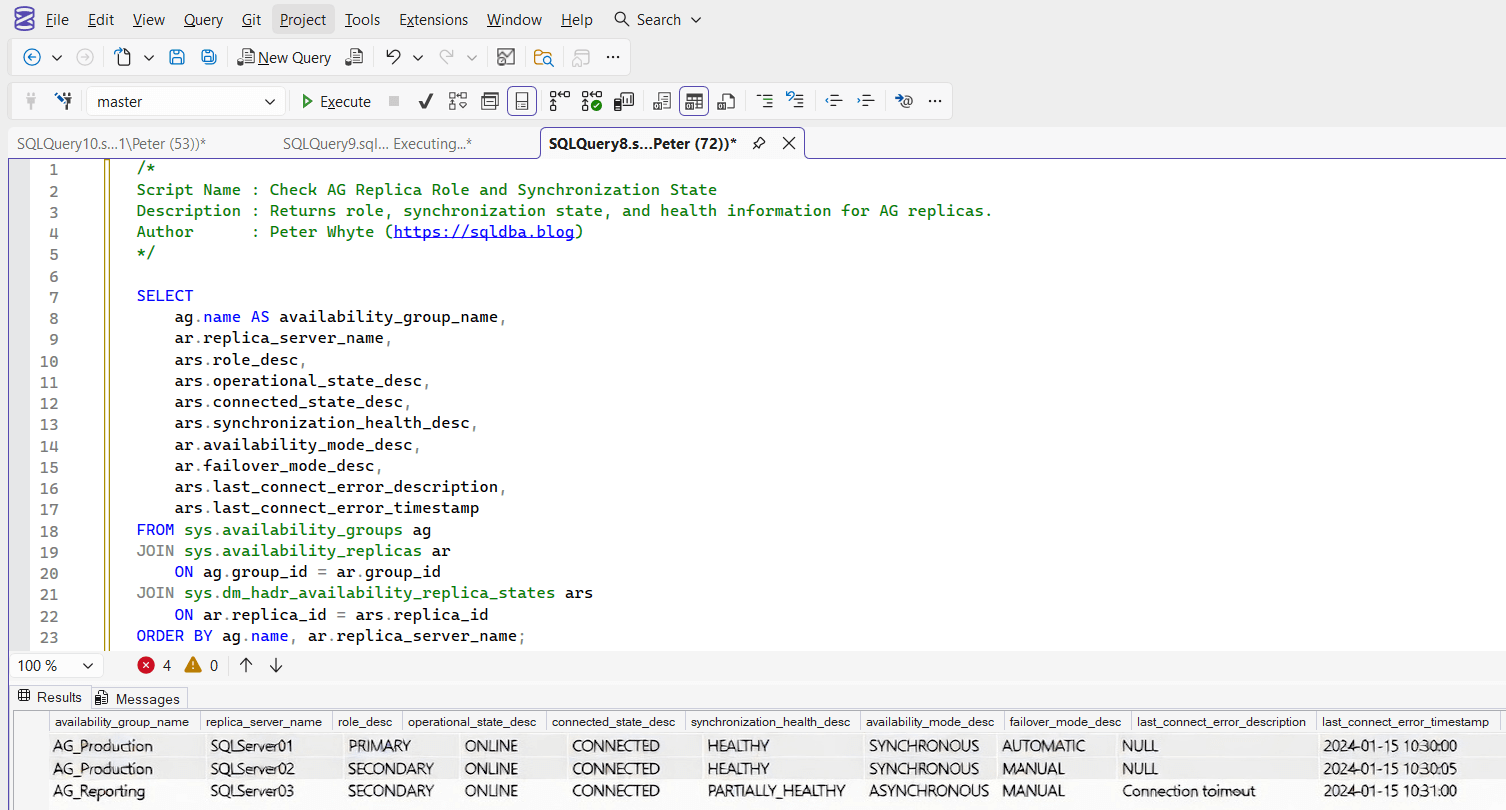
Script: Check AG Replica Role and Synchronization State

🔧Part of the DBA-Tools Project, copy/paste SQL Server scripts and health checks.

Is Every Replica Actually Ready to Take Over

An Availability Group only protects you if every secondary replica is actually connected, synchronized, and healthy at the moment you need it. A replica that quietly dropped its connection hours ago looks identical to a healthy one until you check, and the first time anyone notices is usually during a failover that doesn’t go as planned.

This script reads every replica’s connection state, synchronization health, and last connection error directly from the AG’s own health DMVs, so “is this AG actually failover-ready right now” has a real answer instead of an assumption.


Why Availability Group Replica State Matters

  • connected_state_desc and synchronization_health_desc are the two fastest signals for whether a secondary is actually protecting you, not just configured
  • A replica can stay listed in the AG topology while silently disconnected, last_connect_error_number and last_connect_error_timestamp are what expose that
  • Availability mode (synchronous vs asynchronous commit) changes what “healthy” should even look like, a synchronous replica that’s behind is a much bigger problem than an asynchronous one running a little behind
  • This is exactly the kind of check that’s easy to assume is fine because nothing has alerted, until the day a failover is needed and a replica turns out not to have been ready

When to Run This Script

  • Routine SQL Server health checks on any instance participating in an Availability Group
  • Immediately after any AG failover, planned or unplanned, to confirm every replica came back healthy
  • After a network change, patch, or maintenance window touching any replica
  • Before relying on a secondary for a planned failover or maintenance activity

The Script

Run the following script against your SQL Server instance.

/*
Script Name : Get-AvailabilityGroupReplicaState
Category    : high-availability
Purpose     : Show AG replica health, connection state, and synchronization status for failover readiness.
Author      : Peter Whyte (https://sqldba.blog/script-check-ag-replica-role-and-synchronization-state/)
Requires    : VIEW SERVER STATE
*/
-- Blog: https://sqldba.blog/script-check-ag-replica-role-and-synchronization-state/
-- SAFE:ReadOnly
-- IMPACT:Low
SET NOCOUNT ON;

IF SERVERPROPERTY('IsHadrEnabled') = 0
    OR NOT EXISTS (SELECT 1 FROM sys.availability_groups)
BEGIN
    SELECT 'Always On Availability Groups is not enabled or no groups are configured on this instance.' AS status;
END
ELSE
BEGIN
    SELECT
        ag.name                          AS ag_name,
        ar.replica_server_name,
        ar.availability_mode_desc        AS commit_mode,
        ar.failover_mode_desc,
        ars.role_desc,
        ars.operational_state_desc,
        ars.connected_state_desc,
        ars.synchronization_health_desc,
        ars.recovery_health_desc,
        ars.last_connect_error_number,
        ars.last_connect_error_description,
        ars.last_connect_error_timestamp
    FROM sys.availability_replicas                      AS ar
    JOIN sys.availability_groups                        AS ag  ON ag.group_id   = ar.group_id
    JOIN sys.dm_hadr_availability_replica_states        AS ars ON ars.replica_id = ar.replica_id
    ORDER BY ag.name, ar.replica_server_name;
END

The guard clause up top returns a plain status message rather than an error on an instance where Always On isn’t enabled or configured at all, so the script is always safe to run as a blanket health check across a mixed fleet.


How To Run From The Repo

Clone DBA Tools, initialize and run the script:

# Clone dba-tools repo:
git clone https://github.com/peterwhyte-lgtm/dba-tools

# Initialize environment:
cd dba-tools
.\Initialize-Environment.ps1

# Check every AG replica's connection and sync health:
.\run.ps1 Get-AvailabilityGroupReplicaState

# To run against a remote sql server:
.\run.ps1 Get-AvailabilityGroupReplicaState -ServerInstance SQLSERVER01

This script lives in the repo at:


Example Output

This lab instance doesn’t have Always On enabled at all, so the script correctly returns its guard-clause status message rather than an error or an empty result:

status
Always On Availability Groups is not enabled or no groups are configured on this instance.

On an instance with a real Availability Group configured, a healthy row looks like this:

ag_name replica_server_name commit_mode role_desc connected_state_desc synchronization_health_desc recovery_health_desc
SalesAG SQL01 SYNCHRONOUS_COMMIT PRIMARY CONNECTED HEALTHY ONLINE
SalesAG SQL02 SYNCHRONOUS_COMMIT SECONDARY CONNECTED HEALTHY ONLINE

Understanding the Results

  • connected_state_desc = CONNECTED — the replica is actually communicating with the primary right now. DISCONNECTED means it isn’t, regardless of what the AG topology view shows.
  • synchronization_health_desc = HEALTHY — the replica is caught up (synchronous) or catching up normally (asynchronous). PARTIALLY_HEALTHY or NOT_HEALTHY need immediate investigation.
  • commit_modeSYNCHRONOUS_COMMIT means the primary waits for this replica to harden the log before committing, a disconnected synchronous replica can stall writes on the primary entirely. ASYNCHRONOUS_COMMIT never blocks the primary, but also never guarantees zero data loss on failover.
  • last_connect_error_number / timestamp — the most direct evidence of a real, recent connectivity problem, even if the replica shows connected again now.

Best Practices

  • Treat any DISCONNECTED or unhealthy synchronous replica as urgent, it can be actively stalling writes on the primary, not just a DR gap
  • Check this immediately after every failover, planned or unplanned, don’t assume the old primary rejoined cleanly as a secondary
  • Pair with Availability Group Latency for the database-level detail behind any replica showing sync issues here

Related Scripts

You may also find these scripts useful:


Frequently Asked Questions

What’s the difference between operational_state and connected_state?

connected_state_desc is about network connectivity, whether the replica can currently talk to the primary. operational_state_desc is about the replica’s own role and status (online, pending, etc). A replica can be connected but not yet fully operational right after a restart.

Does a healthy result here guarantee a clean failover?

It confirms the replica is connected and synchronized, the two biggest failure modes, but a full failover readiness check also means confirming listener configuration, endpoint permissions, and (for asynchronous replicas) accepting the possibility of data loss. This script is the fast first check, not the entire runbook.

Summary

Every Availability Group is only as protective as its least healthy replica, and the only way to know that is to actually check connection state and synchronization health, not assume it from the topology configuration alone. A disconnected or unhealthy replica looks identical to a healthy one in the AG dashboard until someone runs a real check.

Run this as a routine health check and immediately after every failover, so a silently disconnected replica gets caught the same day, not the day a failover depends on it.

Comments

Leave a Reply

Your email address will not be published. Required fields are marked *