
xp_cmdshell lets any login with EXECUTE permission on it run arbitrary operating system commands from inside SQL Server. It’s genuinely useful for a handful of legacy automation tasks, and it’s also one of the first things a penetration tester checks for, because a SQL injection vulnerability combined with xp_cmdshell enabled is a direct path to the underlying OS. It’s disabled by default for exactly this reason, and it’s surprising how often it gets left switched on from an old migration or a “just for now” fix that was never reverted.
This script audits xp_cmdshell, CLR execution, Database Mail, connection encryption enforcement, and active NTLM authentication in a single query, the security surface area that’s easy to forget about once it’s configured.
Why Database Mail and xp_cmdshell Matter
Each of these settings expands what’s possible from inside a compromised or malicious SQL session, or reflects how securely clients are connecting:
- xp_cmdshell, direct OS command execution. The highest-impact setting on this list if enabled without a real operational reason.
- CLR enabled / CLR strict security, allows running .NET assemblies inside SQL Server. Strict security (on by default since SQL 2017) requires assemblies to be signed or marked
SAFE, closing off a class of CLR-based privilege escalation. - Database Mail XPs, enables sending email from T-SQL. Lower risk than
xp_cmdshell, but still worth knowing is active. - Force encryption, whether the server requires encrypted connections. Without it, connections can silently fall back to unencrypted, exposing credentials and data on the wire.
- NTLM connections, active sessions authenticated via NTLM instead of Kerberos. NTLM is weaker and doesn’t support delegation; a high count often points at a Kerberos/SPN misconfiguration.
When to Run This Script
- Routine SQL Server health checks
- Security reviews and compliance audits
- After a migration, where legacy settings sometimes get carried over without review
- Investigating a suspected compromise or reviewing after a penetration test
The Script
- Tested on: SQL Server 2025 (RTM CU8), Windows lab instance
- Last verified: 2026-08-31 (all 1 scripts on this page run, saved outputs from real runs)
- Permissions: VIEW SERVER STATE, sysadmin (for xp_cmdshell value_in_use, registry access)
- Safety: read-only, impact low
Run the following script against your SQL Server instance.
/*
Script Name : Get-DatabaseMailAndXpCmdShell
Category    : security
Purpose     : Security surface area audit — xp_cmdshell, CLR, Database Mail, force encryption, and active NTLM connections.
Author      : Peter Whyte (https://sqldba.blog/dba-scripts-get-database-mail-and-xp-cmd-shell/)
Requires    : VIEW SERVER STATE, sysadmin (for xp_cmdshell value_in_use and registry access)
HealthCheck : Yes
*/
-- SAFE:ReadOnly
-- IMPACT:Low
SET NOCOUNT ON;

SELECT
    name,
    CAST(value        AS VARCHAR(20)) AS configured_value,
    CAST(value_in_use AS VARCHAR(20)) AS running_value,
    description
FROM sys.configurations
WHERE name IN (
    'xp_cmdshell',
    'clr enabled',
    'clr strict security',
    'Database Mail XPs'
)

UNION ALL

-- Force encryption: 1 = all connections must encrypt; 0 = encryption optional
SELECT
    'force encryption'                                                              AS name,
    '0'                                                                             AS configured_value,
    ISNULL(
        (SELECT TOP 1 CAST(value_data AS VARCHAR(20))
         FROM   sys.dm_server_registry
         WHERE  registry_key LIKE N'%SuperSocketNetLib%'
         AND    value_name   = N'ForceEncryption'),
        '0'
    )                                                                               AS running_value,
    'ForceEncryption - 1 = all connections must encrypt; 0 = unencrypted allowed'  AS description

UNION ALL

-- Active user sessions authenticated via NTLM (Kerberos is preferred for Windows auth)
SELECT
    'ntlm connections'                                                              AS name,
    '0'                                                                             AS configured_value,
    CAST(
        (SELECT COUNT(*)
         FROM   sys.dm_exec_sessions    AS s
         JOIN   sys.dm_exec_connections AS c ON c.session_id = s.session_id
         WHERE  c.auth_scheme     = 'NTLM'
         AND    s.is_user_process = 1)
    AS VARCHAR(20))                                                                 AS running_value,
    'Active user sessions using NTLM authentication (Kerberos preferred)'           AS description

ORDER BY name;
The script reads relevant flags from sys.configurations, checks the ForceEncryption registry value via sys.dm_server_registry, and counts active NTLM sessions from sys.dm_exec_connections, returning one row per setting.
How To Run From The Repo
Clone DBA Tools, initialize and run the script:
# Clone dba-tools repo:
git clone https://github.com/peterwhyte-lgtm/dba-tools

# Initialize environment:
cd dba-tools
.\Initialize-Environment.ps1

# Audit xp_cmdshell, CLR, Database Mail, encryption, and NTLM usage:
.\run.ps1 Get-DatabaseMailAndXpCmdShell

# To run against a remote sql server:
.\run.ps1 Get-DatabaseMailAndXpCmdShell -ServerInstance SQLSERVER01
This script lives in the repo at:
sql/security/Get-DatabaseMailAndXpCmdShell.sqlpowershell/wrappers/security/Get-DatabaseMailAndXpCmdShell.ps1
Example Output
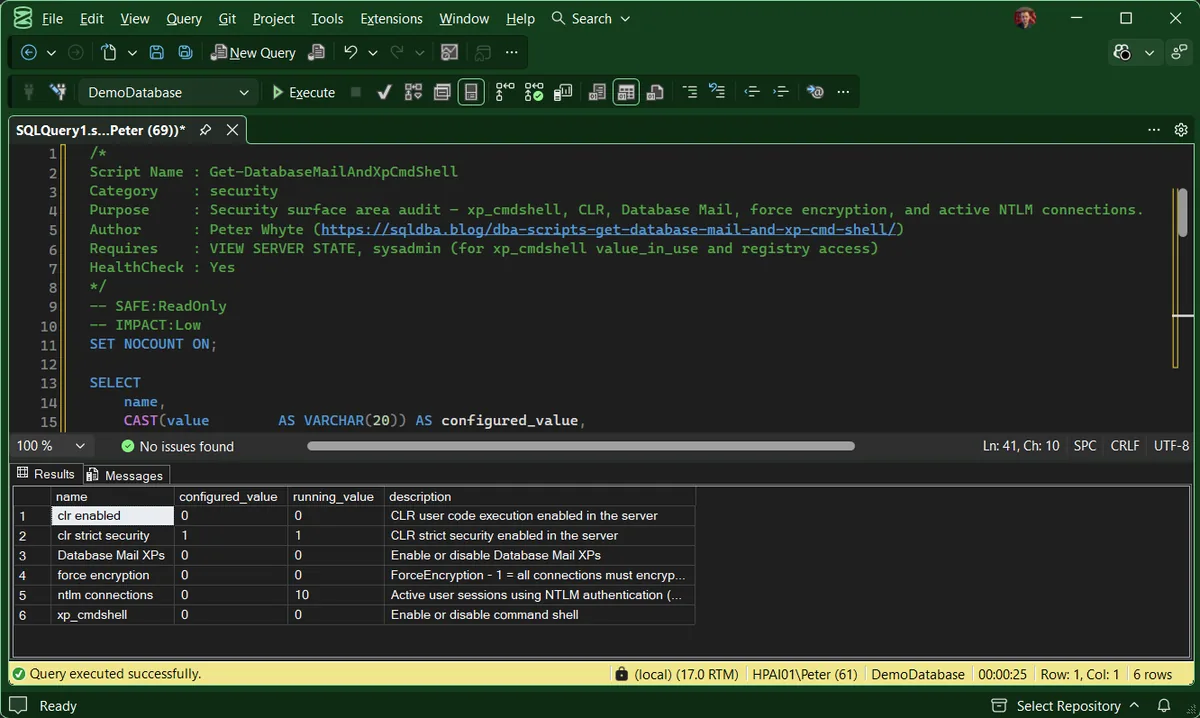
Nothing on this instance is switched on that should not be: xp_cmdshell, CLR and Database Mail all read 0, and CLR strict security reads 1. That is the result you want, and it is worth seeing, a clean report is what you are checking for, not a failed run.
The row that still needs reading is ntlm connections, because it is the only one here that is not a switch. It is a live count of sessions authenticating with NTLM rather than Kerberos, so it changes every time you run it, and its configured_value of 0 is a placeholder rather than a setting.
Understanding the Results
xp_cmdshellrunning_value is 1 without a current, named reason. Check who actually holds EXECUTE on it before deciding.configured_valuerunning_valuesys.configurations rows these are the classic pair, and a difference means someone ran sp_configure without RECONFIGURE, staged but not live. On the last two rows they are not a pair at all: force encryption comes from the registry and ntlm connections is a session count, and both report a hardcoded 0 as their configured value. Act when they differ on one of the four real settings. Everywhere else the difference means nothing, whatever ntlm connections reads is a count of live sessions, not pending drift, and it will differ next time you run it.clr enabledclr strict security0 while the first reads 1.Database Mail XPsforce encryptionsp_configure. 0 means connections may negotiate down to unencrypted, not that they all do, check what your connections actually use. Act when the instance holds sensitive data or crosses an untrusted network.ntlm connectionsHow to Fix Security Surface Area Findings
-- Disable xp_cmdshell if there's no active operational need
EXEC sp_configure 'show advanced options', 1;
RECONFIGURE;
EXEC sp_configure 'xp_cmdshell', 0;
RECONFIGURE;

-- Require encrypted connections (also needs a valid certificate configured
-- in SQL Server Configuration Manager — this alone isn't sufficient)
-- Set via SQL Server Configuration Manager > Protocols > Force Encryption = Yes,
-- then restart the SQL Server service.
Disabling xp_cmdshell and Database Mail XPs takes effect immediately, no restart. Force encryption changes need a service restart and a properly configured certificate to actually work end to end.
Best Practices
- Disable
xp_cmdshellunless there’s a documented, current operational reason to keep it enabled. - Review this security surface area as part of every routine health check, not just during a dedicated security audit.
- If
xp_cmdshellmust stay enabled, restrict who can execute it and audit its usage. - Investigate a persistently high NTLM connection count as a Kerberos configuration issue, not just background noise.
Microsoft’s reference covers sys.dm_server_registry, sys.dm_exec_connections and sys.configurations in full.
Related Scripts
You may also find these scripts useful:
- Security (hub)
- Sysadmin Members, who can turn any of these back on
- User Permissions Audit, whether a specific login can reach
xp_cmdshell - Audit Specifications, DDL Triggers, and Proxy Credentials
- Linked Servers (includes Linked Server Security)
- DBA Scripts: The Complete Guide, the map across every script on this site
Frequently Asked Questions
Why does ntlm connections show a configured value of 0 when the running value is higher?
Because that row is not a configuration setting. It is a live count of sessions authenticating with NTLM, and the script reports a hardcoded 0 in the configured column simply to keep the result set one shape. The same is true of force encryption, which is read from the registry. On those two rows a difference between the columns means nothing at all.
Do I need sysadmin to run this?
For most of it, no. VIEW SERVER STATE covers the session count and the configuration rows. The xp_cmdshell value_in_use and the registry read behind force encryption both want sysadmin, so without it those two rows are the ones that quietly come back wrong rather than erroring.
Is xp_cmdshell always a security risk?
It expands what’s possible from a compromised session, so it’s a risk in proportion to who can execute it and whether the instance has other vulnerabilities (like SQL injection in an application) that could reach it. It’s not automatically dangerous on a locked-down, sysadmin-only instance, but it’s disabled by default for good reason.
Does disabling xp_cmdshell break anything?
Only if something is actively relying on it. Check for SQL Agent jobs, linked application code, or maintenance scripts that call xp_cmdshell before disabling it in production.
Summary
Security surface area settings like these rarely get attention outside of a dedicated audit, but they’re exactly the kind of thing that quietly gets left in a risky state after a migration or a one-off troubleshooting session.
Run this script as part of routine health checks, and treat any enabled setting without a clear, current operational reason as something to close off.
Leave a Reply