
An Extended Events session you stood up for a decommission audit, a login trace, or a stored procedure profile isn’t meant to run forever. Once you’ve got the evidence, it’s just overhead, disk space, buffer memory, and one more thing a future DBA has to figure out the purpose of. The trouble is finding every session worth cleaning up, and generating the exact DDL to remove each one without a typo in a session name.
This script lists every DBA-created session, running or stopped, and hands you the precise STOP/DROP command for each. It doesn’t remove anything itself, it’s a generator, not an executor, so nothing gets torn down by accident.
Why Remove XE Session Matters
Sessions from the Create scripts in this series are deliberately built to be temporary, but “temporary” only holds if someone actually removes them once the evidence is in hand:
- A session left running past its purpose keeps consuming buffer memory and disk space for data nobody’s going to read.
- On pre-2025 SQL Server, without
MAX_DURATION, a session runs indefinitely until someone stops it, there’s no built-in expiry to rely on. - Even on SQL Server 2025+,
MAX_DURATIONstops the session but doesn’t drop its definition or delete its.xelfiles, cleanup is still a manual step. - A stale session with an ambiguous name is exactly the kind of thing that makes the next DBA hesitant to touch anything on the instance, “is this safe to remove” shouldn’t require guesswork.
When to Run This Script
- After reviewing a decommission audit, login activity, or SP execution session’s output and confirming you’re done with it
- As a routine cleanup pass, to catch sessions left running past
MAX_DURATIONon older versions, or forgotten entirely - Before creating a new session, to check for leftover sessions with overlapping names or purposes
- Any time you inherit a server and want an honest list of every non-default Extended Events session sitting on it
The Script
Run the following script against your SQL Server instance.
- Tested on: SQL Server 2025 (RTM CU8), Windows lab instance
- Last verified: 2026-08-30 (saved output from a real run, Remove-XeSession-20260830-152732.csv)
- Permissions: VIEW SERVER STATE
- Safety: read-only, impact low
/*
Script Name : Remove-XeSession
Category    : traces
Purpose     : Lists all DBA-created Extended Events sessions (running and stopped) and generates the DDL to stop and drop each one.
              Copy the remove_cmd value for any session you want to clean up and run it.
              .xel files on disk are NOT deleted — review them first with Get-XeSessionActivity.sql, then delete manually.
Author      : Peter Whyte (https://sqldba.blog/dba-scripts-remove-xe-session/)
Requires    : VIEW SERVER STATE
*/
-- SAFE:ReadOnly
-- IMPACT:Low
SET NOCOUNT ON;

SELECT
    ses.name AS session_name,
    CASE WHEN dm.name IS NOT NULL THEN 'RUNNING' ELSE 'STOPPED' END AS session_status,
    dm.create_time AS started_at,
    DATEDIFF(HOUR, dm.create_time, GETDATE()) AS running_hours,
    ses.startup_state AS auto_start_on_restart,
    COALESCE(
        CAST(CAST(tgt.target_data AS XML).value(
            '(EventFileTarget/File/@name)[1]', 'nvarchar(500)') AS NVARCHAR(500)),
        CONVERT(NVARCHAR(500), f.value)
    ) AS output_file,
    'IF EXISTS (SELECT 1 FROM sys.dm_xe_sessions WHERE name = ' + QUOTENAME(ses.name, '''') + ') ALTER EVENT SESSION ' + QUOTENAME(ses.name) + ' ON SERVER STATE = STOP; DROP EVENT SESSION ' + QUOTENAME(ses.name) + ' ON SERVER;' AS remove_cmd
FROM sys.server_event_sessions ses
LEFT JOIN sys.dm_xe_sessions dm ON dm.name = ses.name
LEFT JOIN sys.dm_xe_session_targets tgt ON tgt.event_session_address = dm.address
                                                        AND tgt.target_name = 'event_file'
LEFT JOIN sys.server_event_session_targets st ON st.event_session_id = ses.event_session_id
                                                        AND st.name = 'event_file'
LEFT JOIN sys.server_event_session_fields f ON f.event_session_id = ses.event_session_id
                                                        AND f.object_id = st.target_id
                                                        AND f.name = 'filename'
WHERE ses.name NOT IN (
    'system_health', 'telemetry_xevents', 'hkenginexesession',
    'AlwaysOn_health', 'sp_server_diagnostics session'
)
ORDER BY CASE WHEN dm.name IS NOT NULL THEN 0 ELSE 1 END, ses.name;
Joins sys.server_event_sessions (every defined session, running or stopped) to sys.dm_xe_sessions (currently running ones only) to determine status, resolves the output file path from whichever source has it, excludes the built-in system sessions, and generates the exact ALTER EVENT SESSION ... STATE = STOP; DROP EVENT SESSION ... command for each row.
How To Run From The Repo
Clone DBA Tools, initialize and run the script:
# Clone dba-tools repo:
git clone https://github.com/peterwhyte-lgtm/dba-tools

# Initialize environment:
cd dba-tools
.\Initialize-Environment.ps1

# List every DBA-created session with its ready-to-run removal command:
.\run.ps1 Remove-XeSession

# To run against a remote sql server:
.\run.ps1 Remove-XeSession -ServerInstance SQLSERVER01
This script lives in the repo at:
Example Output
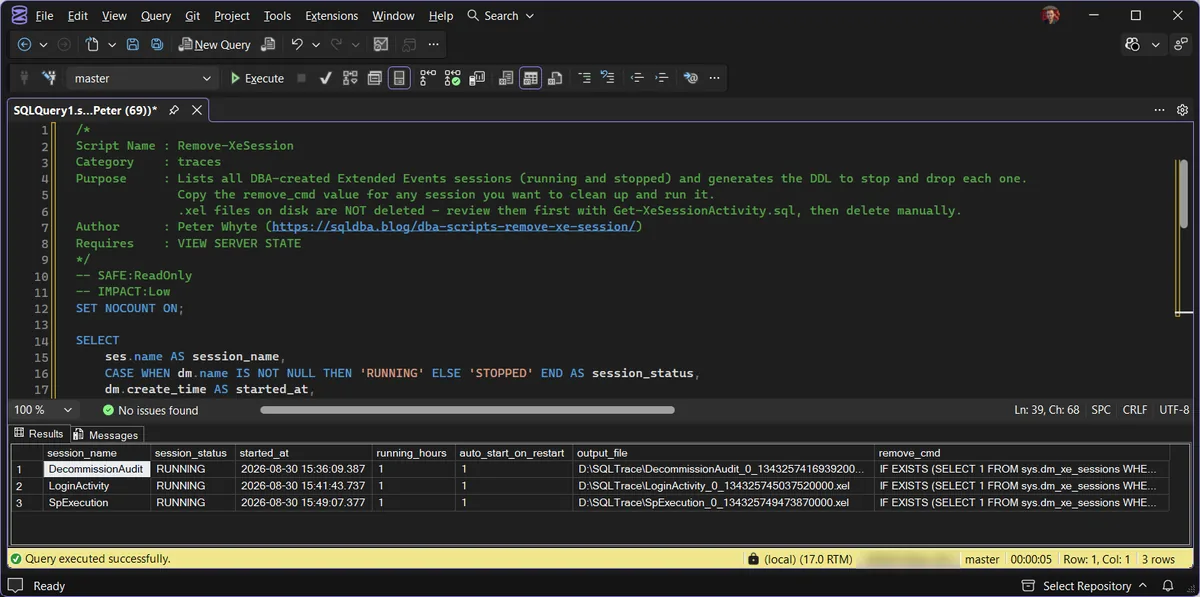
Three sessions, three ready made removal commands. Nothing has been removed by running this: the script is a generator, so the last column is a suggestion you copy for the one session you actually want gone. Note every row is RUNNING here; a stopped session would still appear, because a stopped session still has a definition to drop.
Real output captured against a local SQL Server 2025 instance, all three trace sessions from this series (Create Decommission Audit Session, Create Login Activity Session, Create SP Execution Session) picked up in one pass, exactly the “what have I got running that needs cleaning up” view this script exists for. output_file and remove_cmd aren’t shown in the table above (both are long strings), but the script returns both for every row, remove_cmd for SpExecution here reads ALTER EVENT SESSION [SpExecution] ON SERVER STATE = STOP; DROP EVENT SESSION [SpExecution] ON SERVER;, ready to copy and run.
Understanding the Results
session_statusRUNNING or STOPPED. A stopped session still has a definition sitting in sys.server_event_sessions; it is not gone, just not collecting, and it still needs the DROP half of remove_cmd to actually go.running_hoursoutput_fileremove_cmd for a session whose evidence you have not read. This script deletes nothing itself, but once the session is dropped, collection is over; read first, remove second.remove_cmdBest Practices
- Review a session’s captured data with Get XE Session Activity before removing it, once it’s dropped, that history is only recoverable from whatever
.xelfiles are still on disk. .xelfiles are never deleted by this script, that’s a deliberate separation, decide what to keep as evidence and delete those files manually once you’re satisfied.- Run this as a routine pass, not just when you remember a specific session exists, it’s the only reliable way to catch sessions left running past their intended purpose.
- Don’t blanket-run every
remove_cmdreturned, some sessions here may be legitimately long-running and monitored by someone else, confirm before you stop and drop.
Microsoft’s reference covers sys.server_event_sessions, sys.dm_xe_sessions and sys.dm_xe_session_targets in full.
Related Scripts
You may also find these scripts useful:
- Create Decommission Audit Session
- Create Login Activity Session
- Create SP Execution Session
- Get Active XE Sessions
- Get XE Session Activity
- DBA Scripts: The Complete Guide, the map across every script on this site
Frequently Asked Questions
Does removing a session delete its .xel files?
No. Dropping the session ends collection and removes the definition; the files it already wrote stay on disk, still readable. Archive or delete them separately once the evidence has served its purpose.
Could this generate a command against system_health or another built-in session?
No. The script excludes SQL Server’s own sessions (system_health, telemetry_xevents, and friends) by name, so the output only ever covers sessions a DBA created. The built-ins are not yours to drop, and this generator will not offer to.
Summary
Every trace session in this series is meant to end its life here, reviewed, and either removed or deliberately kept running with a clear reason. This script is the safety net for that step: it finds every DBA-created session on the instance and hands you the exact, per-session command to clean it up, without touching anything until you choose to run it.
Make it a routine pass, not just a reaction to noticing a stray session, and always review with Get XE Session Activity before you drop anything you might still need.
Leave a Reply