
SQL Server: ALTER DATABASE SET ENABLE_BROKER Taking a Long Time (Fix)

After a recent Availability Group failover, Database Mail stopped sending emails. On investigation, the underlying cause was Service Broker not being enabled on msdb, the system database Database Mail runs out of. Enabling it should be instant. Instead the statement sat there, and this is what it was waiting on.

To confirm the status, I ran:

SELECT name, is_broker_enabled
FROM sys.databases;

The is_broker_enabled column was returning 0, indicating that Service Broker was disabled for that database.

I then attempted to enable it:

ALTER DATABASE [database_name] SET ENABLE_BROKER;

The statement did not error, but it did not complete either. It continued running for several minutes, which is far longer than expected for this change.

This behaviour is not version-specific. Enabling Service Broker requires an exclusive database lock. If there are active connections against the database, SQL Server waits for them to disconnect before applying the change.


The Fix

Read before you run this
  • WITH ROLLBACK IMMEDIATE disconnects every other session on the database and rolls back whatever they had in flight. There is no prompt and no undo.
  • The rollback still has to finish before the change applies, so a long transaction does not vanish just because you terminated it.
  • Do this in a planned maintenance window where you can, and confirm what you are actually waiting on first. The check for that is further down this page.

We can force the change by adding WITH ROLLBACK IMMEDIATE to the ALTER DATABASE command:

ALTER DATABASE [database_name]
SET ENABLE_BROKER
WITH ROLLBACK IMMEDIATE;

With this option added, the command completes immediately and Service Broker is enabled.

That is documented behaviour rather than a workaround. Microsoft Documentation for ALTER DATABASE describes this termination option as immediately disconnecting other sessions and rolling back their incomplete transactions before the change is applied. It is the supported way to take the lock when you cannot wait for it.

There was no need to drop queues, contracts, or services. The delay was simply active connections preventing the required lock.
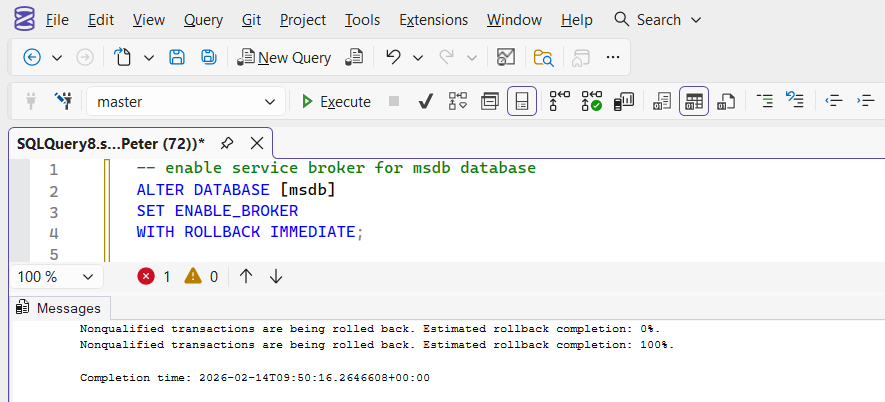
ALTER DATABASE SET ENABLE_BROKER WITH ROLLBACK IMMEDIATE completing successfully in SSMS with commands completed successfully in the Messages tab

Do Not Reach for NEW_BROKER

When ENABLE_BROKER appears to hang, the suggestion you will find most often is to use NEW_BROKER instead. It does complete immediately, which is exactly why it looks like the answer. It is not the same operation.

The same ALTER DATABASE reference linked above is explicit about the difference. ENABLE_BROKER starts message delivery and the database keeps its existing Service Broker identifier. NEW_BROKER issues a new identifier, and every existing conversation in the database is removed immediately without end dialog messages being sent. Any route referencing the old identifier has to be re-created.

So on a database with queued conversations, NEW_BROKER throws them away and nothing tells you it happened. It is the right command when you have restored a copy of a database that already exists elsewhere and needs its own identity. It is the wrong command for a database that is simply waiting on a lock.

🔑The hang is a locking problem, not a broker problem. Fix the locking.Enabling Service Broker is instant. Waiting for an exclusive lock is not.

Confirming Service Broker Status

SELECT name, is_broker_enabled FROM sys.databases returning 1 in SSMS, confirming Service Broker is enabled for the database

You can verify the setting at any time:

SELECT name, is_broker_enabled
FROM sys.databases
WHERE name = 'database_name';

A value of 1 indicates Service Broker is enabled for the database.
A value of 0 indicates it is disabled.


Confirm It’s Actually Blocking Before Forcing It

WITH ROLLBACK IMMEDIATE terminates every other connection to the database, worth confirming that’s really what’s happening before reaching for it, rather than assuming. Check what the ALTER DATABASE session is actually waiting on:

SELECT session_id, status, wait_type, wait_time, blocking_session_id, command
FROM sys.dm_exec_requests
WHERE command LIKE 'ALTER DATABASE%';

A blocking_session_id of 0 with a long wait_time and no obvious wait type points somewhere else entirely, not simply “other connections are open.” If it does show active blockers, see Get Blocking Sessions for the fuller picture of who’s holding what before deciding whether to force the change or wait them out.

If ALTER DATABASE SET ENABLE_BROKER appears stuck, it is almost always waiting on active connections.

Use WITH ROLLBACK IMMEDIATE, apply the change, and continue with your configuration.


Why It Broke After a Failover

This is the part worth carrying away, because it applies well beyond Service Broker.

Database Mail runs out of msdb, and msdb is a system database. System databases are not part of an availability group: each replica has its own. So a failover did not break anything. It moved the workload onto a node whose msdb had never been configured the same way as the one it left.

The mail did not stop because of the failover. It stopped because the configuration had been drifting between the replicas for as long as they had existed, and the failover was simply the first time anybody ran that workload on the other node.

The practical consequence: apply this fix on every replica, not just the one you are on. Then check whatever else lives in msdb and has never been tested on the secondary, starting with Agent jobs, operators and alerts.


Frequently Asked Questions

How long should I wait before forcing it?
There is no useful timeout, because it will wait indefinitely. The question is not how long it has run, it is whether it is genuinely blocked. Run the sys.dm_exec_requests check below. If it names a blocking session, you are waiting on something real and you can decide whether to wait it out. If it does not, forcing the change will not help either.
Is WITH ROLLBACK IMMEDIATE safe on a production database?
It is predictable rather than safe. It disconnects every other session and rolls back their in-flight transactions, so the cost is whatever those sessions were doing. On msdb that is usually tolerable because the workload is Agent jobs and mail. On a user database in the middle of a batch it is not. The rollback also has to finish before the change applies, so a long transaction does not disappear instantly just because you killed it.
Do I need to stop SQL Server Agent first?
Not to run the statement, but it helps. Agent holds connections to msdb, and those connections are part of what the ALTER is waiting on. Stopping Agent removes a reconnecting source of exactly the sessions you are trying to clear, which often lets a plain ENABLE_BROKER complete without forcing anything.
The command completed. Why is Database Mail still not sending?
Broker being enabled is a precondition, not the whole path. Check the mail queue itself and whether the Mail host is started, because a queue that stalled while broker was disabled does not always resume on its own. Service Broker Health and Database Mail Queue reads both in 1 pass.
Will this survive the next failover?
Only on the node you ran it against. msdb is per instance, so the fix has to be applied on every replica. If you have only fixed the active node, the next failover puts you back where you started.
Where To Go Next

This page fixes 1 symptom. These are the checks that tell you whether it is fixed, and what else the same failover may have exposed.

Comments

Leave a Reply

Your email address will not be published. Required fields are marked *