
The default database decides which database a login lands in when it connects without naming one. It is one line to change, and the reason it is worth a post is that SQL Server will happily let you set it to something that does not work, then say nothing until the next person tries to log in.
Everything below was run on a SQL Server 2025 instance.
Setting It
ALTER LOGIN is the supported way, and it is the same statement for a SQL login and
a Windows login:
ALTER LOGIN [AppUser]        WITH DEFAULT_DATABASE = [SalesDB];
ALTER LOGIN [DOMAIN\jbloggs]  WITH DEFAULT_DATABASE = [SalesDB];
Confirm it stuck:
SELECT  name,
        type_desc,
        default_database_name,
        is_disabled
FROM    sys.server_principals
WHERE   type IN ('S', 'U', 'G')
ORDER BY default_database_name, name;
A newly created SQL login starts on master. That is the safe choice rather than a good one: master always exists, so the login always connects, and people then create objects in master by accident.

You will still see sp_defaultdb in older scripts. It works and it is deprecated,
so use ALTER LOGIN in anything you are writing today.
The Trap: Setting It Does Not Check It
SQL Server does not verify that the login can actually use the database you name.
Tested directly: ALTER LOGIN was pointed at a database in which the login had no user
at all. It was accepted without a warning, and sys.server_principals reported the new
value quite happily.
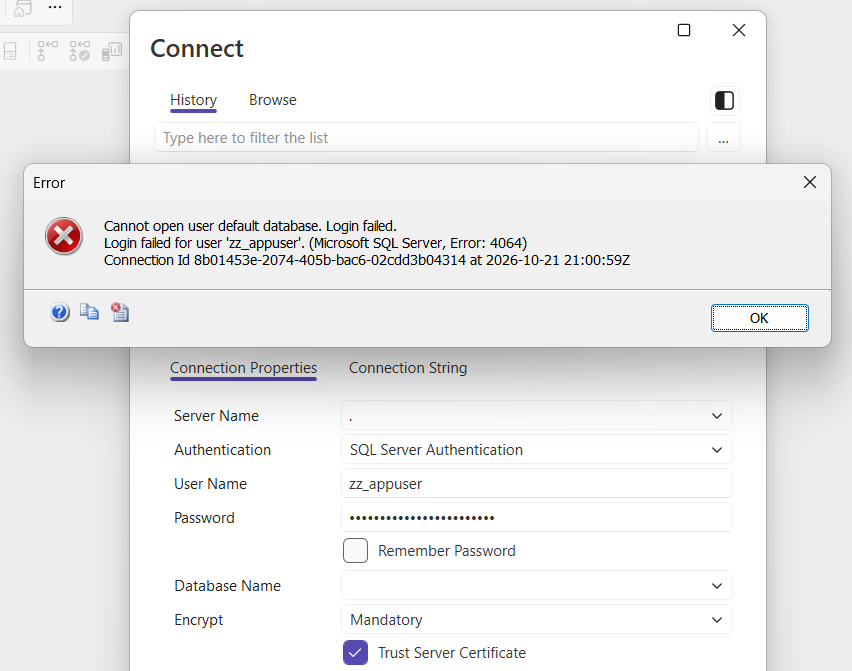
The next connection attempt for that login failed with Msg 4064:
Note when that happened. The database still existed. The login simply had no access to it. So the requirement is not that the database exists, it is that this login can open it, and the error is identical either way. Two different mistakes, one message.
Which means setting a default database is really two steps, and the second is the one people skip:
-- 1. the login can get into the database
USE SalesDB;
CREATE USER [AppUser] FOR LOGIN [AppUser];

-- 2. and only now is the default worth setting
ALTER LOGIN [AppUser] WITH DEFAULT_DATABASE = [SalesDB];
Microsoft’s reference covers ALTER LOGIN and sys.server_principals in full.
Finding the Ones Already Broken
Dropping a database does not tidy up the logins that pointed at it. Verified: after the database was dropped, the login still carried its name as the default, and nothing flagged it. After any decommission, that is a set of logins waiting to fail at some future reconnect.
This finds them in one pass:
SELECT  sp.name                  AS login_name,
        sp.type_desc,
        sp.default_database_name,
        sp.is_disabled
FROM    sys.server_principals sp
LEFT JOIN sys.databases d ON d.name = sp.default_database_name
WHERE   sp.type IN ('S', 'U', 'G')
AND     sp.default_database_name IS NOT NULL
AND     d.database_id IS NULL          -- the database is gone
ORDER BY sp.name;
Anything returned there is a login that cannot connect without naming a database explicitly. The fix is to point it somewhere real:
ALTER LOGIN [OrphanedLogin] WITH DEFAULT_DATABASE = [master];That query catches the missing-database case. The no-access case is harder to spot in bulk, because access depends on the database being online and readable at the time you check, so treat it as a per-login check when someone reports a login failure.
Getting Back In When You Are Locked Out
If you have done this to yourself, you are not locked out. The default only applies when the
connection does not name a database, so name one. In SSMS, on the connection dialog choose
Options, then the Connection Properties tab, and type
master into Connect to database. From the command line:
sqlcmd -S YourServer -U AppUser -P YourPassword -d masterThen fix the login properly with ALTER LOGIN.
Default Database Is Not Default Schema
These get confused constantly, and they live at different levels.
| Default database | Default schema | |
|---|---|---|
| Belongs to | the login, at server level | the user, inside one database |
| Decides | which database you land in on connect | how unqualified object names resolve |
| Set with | ALTER LOGIN ... WITH DEFAULT_DATABASE |
ALTER USER ... WITH DEFAULT_SCHEMA |
| Starts as | master for a new SQL login | dbo for a new user |
Both were checked on the instance. Changing one does nothing to the other, so if unqualified object names are resolving oddly, the default database is not your problem.
Frequently Asked Questions
Does SQL Server check the database when I set it?
No, and this is the whole problem. Tested on SQL Server 2025: ALTER LOGIN accepted a default database in which the login had no user at all, with no warning. The next connection attempt for that login then failed. The setting is recorded faithfully and validated only at login time.
What is the difference between default database and default schema?
Different things at different levels. The default database belongs to the login and decides which database you land in when you connect. The default schema belongs to a user inside one database and decides how unqualified object names resolve. A new user gets dbo. Changing one has no effect on the other.
Will changing it affect people who are already connected?
No. It applies to the next connection. Anyone already connected keeps the session they have, which is why a change made during the day often appears to have done nothing until people reconnect the following morning.
Should I use sp_defaultdb?
No. It still ships and it still works, but it is deprecated and Microsoft has said so for years. ALTER LOGIN is the supported route, works for Windows and SQL logins alike, and is what every current script uses.
Why do my logins point at databases that no longer exist?
Because dropping a database does not tidy up the logins that referenced it. Verified: after the database was dropped, the login still had its name recorded as the default. That is a quiet landmine after any decommission, and the audit query above finds them in one pass.
Is master a sensible default?
It is the safe default rather than a good one, and that is why SQL Server uses it. A login whose default is master will always connect, but people then create objects in master by accident because they forgot to switch. Point application logins at the database they actually use.
Summary
ALTER LOGIN [x] WITH DEFAULT_DATABASE = [db] sets it, for Windows and SQL logins
alike. SQL Server does not check that the login can use that database, so create the user first
and set the default second. When a login cannot connect with Cannot open user default
database, the database is either gone or inaccessible, and the message is the same for both.
Naming a database on the connection gets you back in either way.
Related
- Login Failed or Permission Denied, the incident that sends you here, and the ones that do not
- Cannot Open Database Requested by the Login (Errors 4060 and 18456)
- SQL Server Login Migration: What Gets Silently Left Behind
- DBA Scripts: Generate Login Script
- Troubleshoot Login Failed for User (Error 18456)
- CREATE USER WITHOUT LOGIN vs Contained Database Users
- DBA Scripts: Get Login Security Audit
Leave a Reply