
DBCC CHECKDB is the only thing that actually confirms a database’s data is structurally sound; backups only prove a database can be restored, not that what gets restored is undamaged. Skipping it, or letting it silently stop running, means corruption can sit undetected for weeks or months before anyone notices, often only when a query fails or a restore reveals the damage was there all along.
This script checks every user database’s last successful CHECKDB completion time in a single query, no need to dig through job history or check each database individually.
Why Last DBCC CHECKDB Matters
Corruption doesn’t always announce itself immediately. A damaged page might sit untouched for a long time before a query happens to read it. When corruption does announce itself, it usually arrives as I/O errors 823 and 824 or the read-retry warning 825, and by then the damage already exists:
CHECKDBis the only routine check that verifies structural and allocation integrity, not just that a backup file exists- Corruption caught early is usually fixable from a recent clean backup; corruption caught late may mean every recent backup is also corrupt
- A
NEVER_RUNresult on a production database is a real gap, not a formality - Microsoft’s own guidance is weekly at minimum; this script makes it trivial to confirm that’s actually happening
When to Run This Script
- Routine SQL Server health checks
- Auditing a server or estate you’ve just inherited
- Investigating a suspected corruption issue or an unexplained restore failure
- Confirming maintenance jobs are actually running, not just scheduled
The Script
Run the following script against your SQL Server instance.
- Tested on: SQL Server 2025 (RTM CU8), Windows lab instance
- Last verified: 2026-08-30 (saved output from a real run, Get-LastDbccCheckdb-20260830-112526.csv)
- Permissions: VIEW ANY DATABASE
- Safety: read-only, impact low
Any thresholds in this script are operational heuristics; claim types are labelled where they appear in the text.
/*
Script Name : Get-LastDbccCheckdb
Category    : maintenance-and-reliability
Purpose     : Show when each user database last had a successful DBCC CHECKDB run.
Author      : Peter Whyte (https://sqldba.blog/dba-scripts-get-last-dbcc-checkdb/)
Requires    : VIEW ANY DATABASE
Notes       : Uses DATABASEPROPERTYEX('LastGoodCheckDbTime') — available SQL Server 2016 SP2+.
              Returns 1900-01-01 (not NULL) when CHECKDB has never completed successfully;
              the script maps that sentinel to NULL / NEVER_RUN.
              Microsoft recommends running CHECKDB at least weekly.
HealthCheck : Yes
*/
-- SAFE:ReadOnly
-- IMPACT:Low
SET NOCOUNT ON;

SELECT
    d.name                                              AS database_name,
    d.state_desc,
    d.recovery_model_desc,
    x.last_good_checkdb,
    DATEDIFF(DAY, x.last_good_checkdb, GETDATE())       AS days_since_checkdb,
    CASE
        WHEN x.last_good_checkdb IS NULL
            THEN 'NEVER_RUN'
        WHEN DATEDIFF(DAY, x.last_good_checkdb, GETDATE()) > 7
            THEN 'STALE'
        ELSE 'OK'
    END                                                 AS checkdb_status
FROM sys.databases AS d
CROSS APPLY (
    -- LastGoodCheckDbTime reports 1900-01-01 when CHECKDB has never run; treat as NULL
    SELECT NULLIF(
        CAST(DATABASEPROPERTYEX(d.name, 'LastGoodCheckDbTime') AS DATETIME),
        '19000101') AS last_good_checkdb
) AS x
WHERE d.database_id > 4
ORDER BY last_good_checkdb ASC;
The script reads DATABASEPROPERTYEX(..., 'LastGoodCheckDbTime') for every online user database and classifies each as OK, STALE (over 7 days), or NEVER_RUN.
How To Run From The Repo
Clone DBA Tools, initialize and run the script:
# Clone dba-tools repo:
git clone https://github.com/peterwhyte-lgtm/dba-tools

# Initialize environment:
cd dba-tools
.\Initialize-Environment.ps1

# Check last successful DBCC CHECKDB per database:
.\run.ps1 Get-LastDbccCheckdb

# To run against a remote sql server:
.\run.ps1 Get-LastDbccCheckdb -ServerInstance SQLSERVER01
This script lives in the repo at:
sql/monitoring/databases/Get-LastDbccCheckdb.sqlpowershell/wrappers/monitoring/databases/Get-LastDbccCheckdb.ps1
Example Output
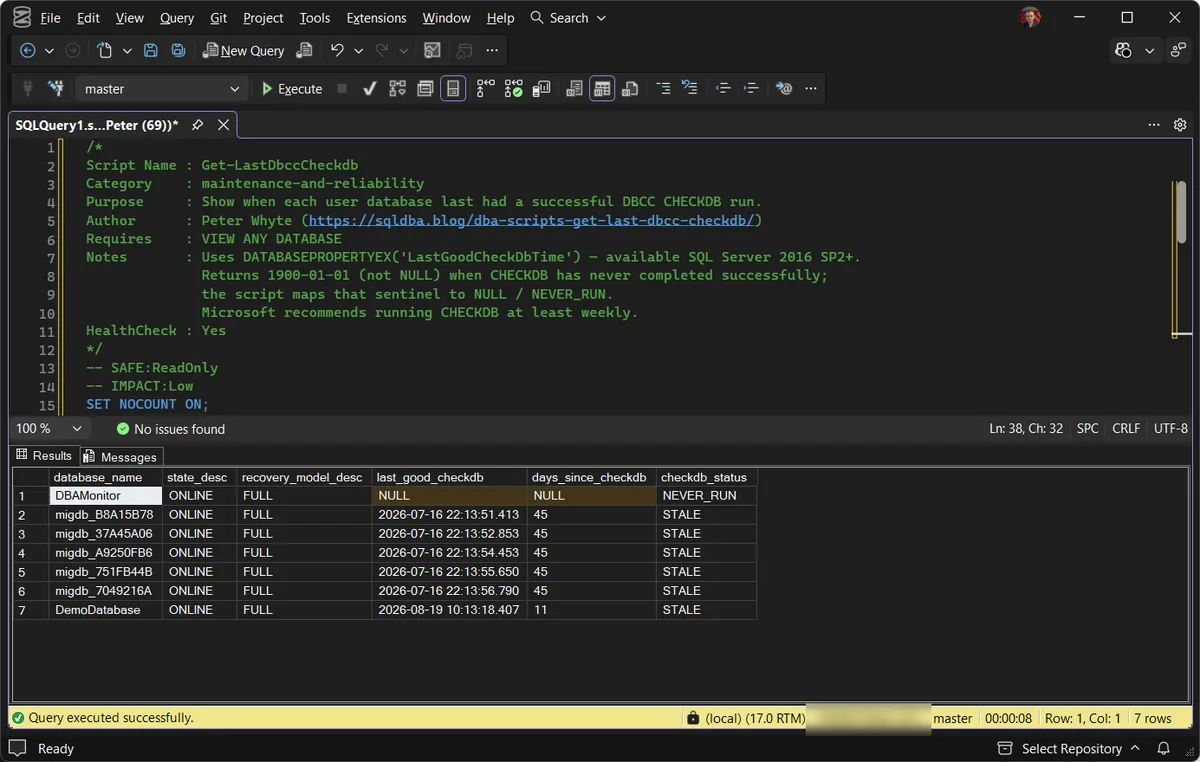
This capture tells a less comfortable story than a clean lab usually does. The top row is the one to act on: DBAMonitor shows NULL dates and NEVER_RUN, meaning CHECKDB has never completed against it on this instance. The other six databases are all STALE at 11 to 45 days, which points at a maintenance schedule that stopped running rather than one that never existed. Two different problems, one result set.
Understanding the Results
state_descrecovery_model_desclast_good_checkdbCHECKDB has never completed successfully here (the underlying property reports the 1900-01-01 epoch for that, which the script normalizes).days_since_checkdbcheckdb_statusOK, STALE (over 7 days by this script’s default), or NEVER_RUN.Act when NEVER_RUN shows on a database that has been in production for a while. Undetected corruption can outlive every clean backup you still have; this is the health check’s CRITICAL tier, not a formality.One benign case to know: a database that was recently restored or attached shows NEVER_RUN until CHECKDB completes against it at least once on this instance. Expected, though still worth scheduling promptly.
How to Fix a Stale or Missing CHECKDB Schedule
-- Run CHECKDB manually against a specific database
DBCC CHECKDB ('YourDatabase') WITH NO_INFOMSGS, ALL_ERRORMSGS;
For ongoing coverage, schedule it through SQL Server Agent, this site’s integrity and housekeeping job generator, or Ola Hallengren’s maintenance solution, rather than relying on manual runs.
If CHECKDB itself comes back with errors, that is a different job: what to do when CHECKDB finds corruption. And for the worst case, error 3417 covers a master database that cannot recover.
Best Practices
- Schedule
CHECKDBat least weekly on every production database; more often for critical, high-change databases. - Treat a
NEVER_RUNresult on a database that’s been in production for a while as urgent, not routine. - Run
CHECKDBbefore and after major maintenance (index rebuilds, upgrades, migrations) to establish a clean baseline. - If
CHECKDBruntime is a problem on large databases, considerWITH PHYSICAL_ONLYfor more frequent lightweight checks between full runs, not as a permanent replacement.
Microsoft’s reference covers DBCC CHECKDB, DATABASEPROPERTYEX, and sys.databases in full.
Related Scripts
You may also find these scripts useful:
- Database Health
- Suspect Pages and Integrity Checks
- Generate Integrity and Housekeeping Jobs
- DBA Scripts: The Complete Guide, the map across every script on this site
Frequently Asked Questions
Does a recent backup mean the database is free of corruption?
No. A backup only proves the database can be restored, not that its data pages are structurally sound. CHECKDB is the actual integrity check; backups and integrity checks answer different questions.
How often should CHECKDB actually run?
Weekly at minimum, per Microsoft’s own guidance. Larger or more critical databases often warrant more frequent checks, balanced against the resource cost of running it.
What does a last_good_checkdb of 1900-01-01 mean?
That is the value DATABASEPROPERTYEX(…, 'LastGoodCheckDbTime') reports when CHECKDB has never completed successfully on that database: the 1900 epoch, not NULL. The script on this page normalizes it, so a never-checked database shows a blank date and NEVER_RUN instead of pretending to be 46,000 days stale.
Summary
CHECKDB is the one maintenance task that actually answers “is this data sound,” and it’s exactly the kind of thing that quietly stops running without anyone noticing until it matters.
Run this script as part of routine health checks, and treat any NEVER_RUN or long-STALE result on a production database as something to fix immediately, not queue for later.
Leave a Reply