
An audit or a pen test report asks whether xp_cmdshell is on, or alert emails stopped arriving and you need to know whether Database Mail is even switched on. This script answers both in one result, alongside CLR, force encryption and live NTLM sessions.
Why Database Mail and xp_cmdshell Matter
Each of these settings expands what’s possible from inside a compromised or malicious SQL session, or reflects how securely clients are connecting:
- xp_cmdshell, operating system commands from T-SQL. A sysadmin caller runs them as the SQL Server service account; anyone else needs
EXECUTEon it plus the##xp_cmdshell_proxy_account##credential, and runs as that account (MS Docs). The highest-impact setting on this list, and one of the first things a penetration tester checks after finding a SQL injection. - CLR enabled / CLR strict security, runs .NET assemblies inside SQL Server. Strict security, on by default since SQL Server 2017, treats every assembly as
UNSAFE: it loads only if it is signed by a certificate or asymmetric key whose login holdsUNSAFE ASSEMBLY, or is on the trusted assembly list. Marking itSAFEno longer protects anything (MS Docs). - Database Mail XPs, whether T-SQL can send mail at all.
0, the default, means Database Mail isn’t available, so nothing that relies on it sends, Agent alert emails included (MS Docs). Lower risk thanxp_cmdshell. - Force encryption, whether the server requires encrypted connections. Without it, connections can silently fall back to unencrypted, exposing credentials and data on the wire.
- NTLM connections, active sessions authenticated via NTLM instead of Kerberos. NTLM is weaker and doesn’t support delegation; a high count often points at a Kerberos/SPN misconfiguration.
When to Run This Script
- An audit, compliance review or penetration test asks whether
xp_cmdshellis enabled - Alert or job notification emails stopped arriving
- Investigating a suspected compromise
- After a migration, where legacy settings sometimes get carried over without review
- Routine SQL Server health checks
The Script
Run the following script against your SQL Server instance.
- Tested on: SQL Server 2025 (RTM CU8) 17.0.4075.5, Windows lab instance
- Last verified: 2026-10-05 (a real run on the lab instance matches the Example Output row for row)
- Permissions: VIEW SERVER STATE (VIEW SERVER PERFORMANCE STATE on SQL Server 2022 and later); without it the script fails with Msg 300 and returns nothing. sysadmin is not needed
- Safety: read-only, impact low
/*
Script Name : Get-DatabaseMailAndXpCmdShell
Category    : security
Purpose     : Security surface area audit — xp_cmdshell, CLR, Database Mail, force encryption, and active NTLM connections.
Author      : Peter Whyte (https://sqldba.blog/dba-scripts-get-database-mail-and-xp-cmd-shell/)
Requires    : VIEW SERVER STATE, sysadmin (for xp_cmdshell value_in_use and registry access)
HealthCheck : Yes
*/
-- SAFE:ReadOnly
-- IMPACT:Low
SET NOCOUNT ON;

SELECT
    name,
    CAST(value        AS VARCHAR(20)) AS configured_value,
    CAST(value_in_use AS VARCHAR(20)) AS running_value,
    description
FROM sys.configurations
WHERE name IN (
    'xp_cmdshell',
    'clr enabled',
    'clr strict security',
    'Database Mail XPs'
)

UNION ALL

-- Force encryption: 1 = all connections must encrypt; 0 = encryption optional
SELECT
    'force encryption'                                                              AS name,
    '0'                                                                             AS configured_value,
    ISNULL(
        (SELECT TOP 1 CAST(value_data AS VARCHAR(20))
         FROM   sys.dm_server_registry
         WHERE  registry_key LIKE N'%SuperSocketNetLib%'
         AND    value_name   = N'ForceEncryption'),
        '0'
    )                                                                               AS running_value,
    'ForceEncryption - 1 = all connections must encrypt; 0 = unencrypted allowed'  AS description

UNION ALL

-- Active user sessions authenticated via NTLM (Kerberos is preferred for Windows auth)
SELECT
    'ntlm connections'                                                              AS name,
    '0'                                                                             AS configured_value,
    CAST(
        (SELECT COUNT(*)
         FROM   sys.dm_exec_sessions    AS s
         JOIN   sys.dm_exec_connections AS c ON c.session_id = s.session_id
         WHERE  c.auth_scheme     = 'NTLM'
         AND    s.is_user_process = 1)
    AS VARCHAR(20))                                                                 AS running_value,
    'Active user sessions using NTLM authentication (Kerberos preferred)'           AS description

ORDER BY name;
The script reads four switches from sys.configurations, looks for the ForceEncryption value in sys.dm_server_registry, and counts NTLM user sessions in sys.dm_exec_connections, one row per setting. On SQL Server 2025 CU8 that registry view returns no ForceEncryption value at all, so the force encryption row prints 0 whatever the server is set to.
How To Run From The Repo
Clone DBA Tools, initialize and run the script:
# Clone dba-tools repo:
git clone https://github.com/peterwhyte-lgtm/dba-tools

# Initialize environment:
cd dba-tools
.\Initialize-Environment.ps1

# Audit xp_cmdshell, CLR, Database Mail, encryption, and NTLM usage:
.\run.ps1 Get-DatabaseMailAndXpCmdShell

# To run against a remote sql server:
.\run.ps1 Get-DatabaseMailAndXpCmdShell -ServerInstance SQLSERVER01
This script lives in the repo at:
sql/security/Get-DatabaseMailAndXpCmdShell.sqlpowershell/wrappers/security/Get-DatabaseMailAndXpCmdShell.ps1
Example Output
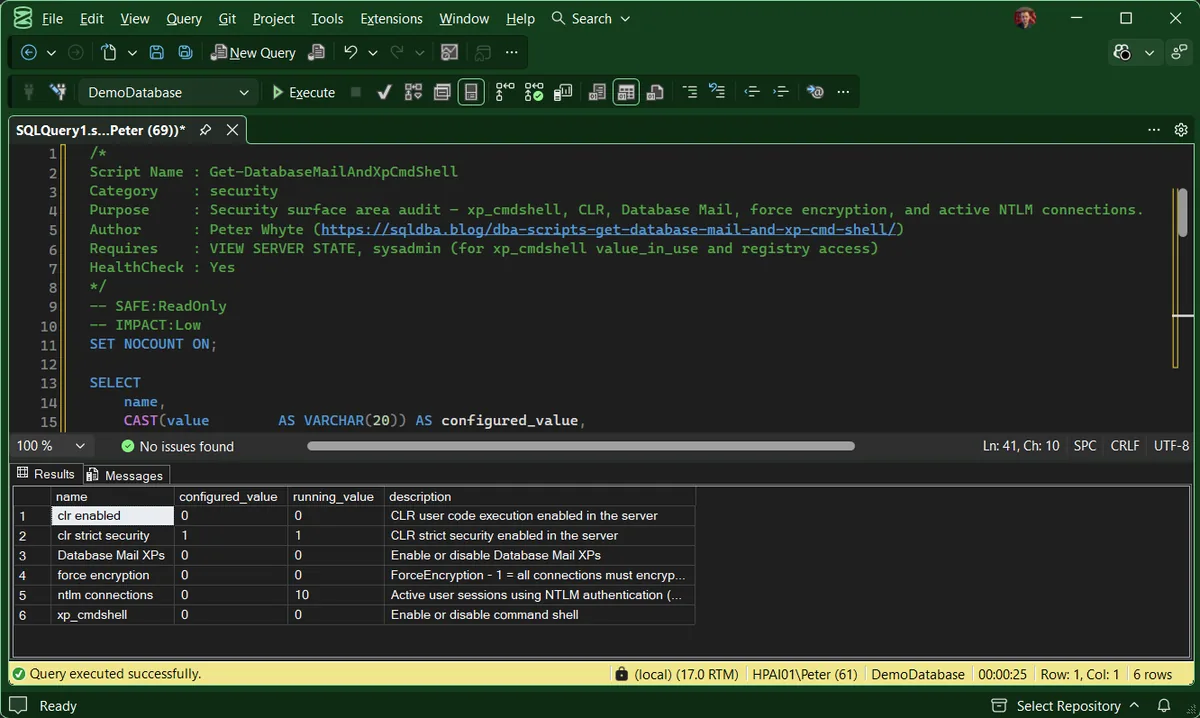
Nothing in this result is switched on that should not be: xp_cmdshell, CLR and Database Mail all read 0, and CLR strict security reads 1. A clean report is what you are checking for, not a failed run. The force encryption 0 happens to match this server’s registry, but the script would print it either way.
The row that still needs reading is ntlm connections, because it is the only one here that is not a switch. It is a live count of sessions authenticating with NTLM rather than Kerberos, so it changes every time you run it, and its configured_value of 0 is a placeholder rather than a setting.
Understanding the Results
xp_cmdshell##xp_cmdshell_proxy_account## credential for anyone else. The highest-value row here. Act when running_value is 1 without a current, named reason. Check who actually holds EXECUTE on it, and whether a proxy credential exists, before deciding.configured_valuerunning_valuesys.configurations rows these are the classic pair, and a difference means someone ran sp_configure without RECONFIGURE, staged but not live. On the last two rows they are not a pair at all: force encryption comes from the registry and ntlm connections is a session count, and both report a hardcoded 0 as their configured value. Act when they differ on one of the four real settings. Everywhere else the difference means nothing, whatever ntlm connections reads is a count of live sessions, not pending drift, and it will differ next time you run it.clr enabledclr strict security0 while the first reads 1.Database Mail XPs0 means no alert email can leave this server. If it reads 1 and alerts still are not arriving, the switch is not the problem, check the mail queue. Act when it reads 0 on a server that is meant to alert, or 1 and nobody can name the profile or the jobs using it.force encryptionsys.dm_server_registry returns the Tcp, Np, Sm and Via subkeys of SuperSocketNetLib but not the ForceEncryption value on the key itself, so this row is the script’s fallback 0 even with Force Encryption set to Yes. Act when you need the real answer: read Force Encryption in SQL Server Configuration Manager, or check what your connections actually use.ntlm connectionsHow to Fix Security Surface Area Findings
-- Disable xp_cmdshell if there's no active operational need
EXEC sp_configure 'show advanced options', 1;
RECONFIGURE;
EXEC sp_configure 'xp_cmdshell', 0;
RECONFIGURE;

-- Require encrypted connections (also needs a valid certificate configured
-- in SQL Server Configuration Manager, this alone isn't sufficient)
-- Set via SQL Server Configuration Manager > Protocols > Force Encryption = Yes,
-- then restart the SQL Server service.
Disabling xp_cmdshell and Database Mail XPs takes effect immediately, no restart. Force encryption changes need a service restart and a properly configured certificate to actually work end to end.
Best Practices
- Disable
xp_cmdshellunless there’s a documented, current operational reason to keep it enabled. - Review this security surface area as part of every routine health check, not just during a dedicated security audit.
- If
xp_cmdshellmust stay enabled, restrict who can execute it and audit its usage. - Investigate a persistently high NTLM connection count as a Kerberos configuration issue, not just background noise.
MS Docs covers xp_cmdshell and its proxy account, sys.dm_server_registry and sys.configurations in full.
Related Scripts
You may also find these scripts useful:
- SQL Server Agent Will Not Start, or “Agent XPs Component Is Turned Off” (Error 15281), the sibling surface-area switches 15281 also guards
- Security (hub)
- Sysadmin Members, who can turn any of these back on
- User Permissions Audit, whether a specific login can reach
xp_cmdshell - Audit Specifications, DDL Triggers, and Proxy Credentials, lists every server credential, which is where
##xp_cmdshell_proxy_account##shows up - Service Broker Health and Database Mail Queue, when Database Mail XPs reads
1and alerts still are not arriving - Linked Servers (includes Linked Server Security)
- DBA Scripts: The Complete Guide, the map across every script on this site
Frequently Asked Questions
Why does ntlm connections show a configured value of 0 when the running value is higher?
Because that row is not a configuration setting. It is a live count of sessions authenticating with NTLM, and the script reports a hardcoded 0 in the configured column simply to keep the result set one shape. The same is true of force encryption, which is read from the registry. On those two rows a difference between the columns means nothing at all.
Do I need sysadmin to run this?
No. VIEW SERVER STATE is enough (VIEW SERVER PERFORMANCE STATE on SQL Server 2022 and later), and returns the same 6 rows as sysadmin. Without it nothing comes back quietly wrong: the script fails with Msg 300 and returns no rows, because sys.dm_server_registry and sys.dm_exec_connections both need it. The 4 sys.configurations rows on their own are readable by any login.
Why does force encryption read 0 when Force Encryption is set to Yes?
Because the script never finds the value. ForceEncryption sits on the SuperSocketNetLib registry key itself, and sys.dm_server_registry only returns that key’s subkeys, so the lookup comes back empty and the script substitutes 0. Check Force Encryption in SQL Server Configuration Manager, under the Protocols properties for the instance, or look at encrypt_option in sys.dm_exec_connections to see which connections are actually encrypted.
Alert emails stopped arriving. Is Database Mail switched off?
If Database Mail XPs reads 0, yes: nothing can send until it is 1. If it reads 1, the switch is not the problem, so look at the mail queue and the failed items in msdb next.
Is xp_cmdshell always a security risk?
It expands what’s possible from a compromised session, so it’s a risk in proportion to who can execute it and whether the instance has other vulnerabilities (like SQL injection in an application) that could reach it. It’s not automatically dangerous on a locked-down, sysadmin-only instance, but it’s disabled by default for good reason.
Does disabling xp_cmdshell break anything?
Only if something is actively relying on it. Check for SQL Agent jobs, linked application code, or maintenance scripts that call xp_cmdshell before disabling it in production.
Summary
Security surface area settings like these rarely get attention outside of a dedicated audit, but they’re exactly the kind of thing that quietly gets left in a risky state after a migration or a one-off troubleshooting session.
Run this script as part of routine health checks, and treat any enabled setting without a clear, current operational reason as something to close off.
Leave a Reply