
Blocking is one of the most common causes of performance issues in SQL Server.
When one session holds a lock on a resource and another session needs that same resource, the second session waits. If that wait persists, users experience slowness.
Understanding how to quickly identify blocking SPIDs is a core DBA skill.
This guide shows two scripts:
- See what is blocked right now
- Identify the lead blocker
That’s usually all you need during an incident.
Script 1 – Quick Check for Blocking SPIDs
Start here when something feels slow.
This script shows:
- Blocked sessions
- Who is blocking them
- Wait type
- Wait duration
- Open transactions
- The exact statement currently executing
-- quick check for blocking sessions
SELECT
    r.session_id,
    r.blocking_session_id,
    s.host_name,
    s.login_name,
    DB_NAME(r.database_id) AS database_name,
    s.program_name,
    r.status,
    r.wait_type,
    CAST(r.wait_time / 1000.0 AS DECIMAL(10,2)) AS wait_seconds,
    CAST(r.total_elapsed_time / 1000.0 AS DECIMAL(10,2)) AS elapsed_seconds,
    r.open_transaction_count,
    LEFT(t.text, 400) AS running_sql
FROM sys.dm_exec_requests r
JOIN sys.dm_exec_sessions s
    ON r.session_id = s.session_id
CROSS APPLY sys.dm_exec_sql_text(r.sql_handle) t
WHERE r.blocking_session_id <> 0
ORDER BY r.wait_time DESC;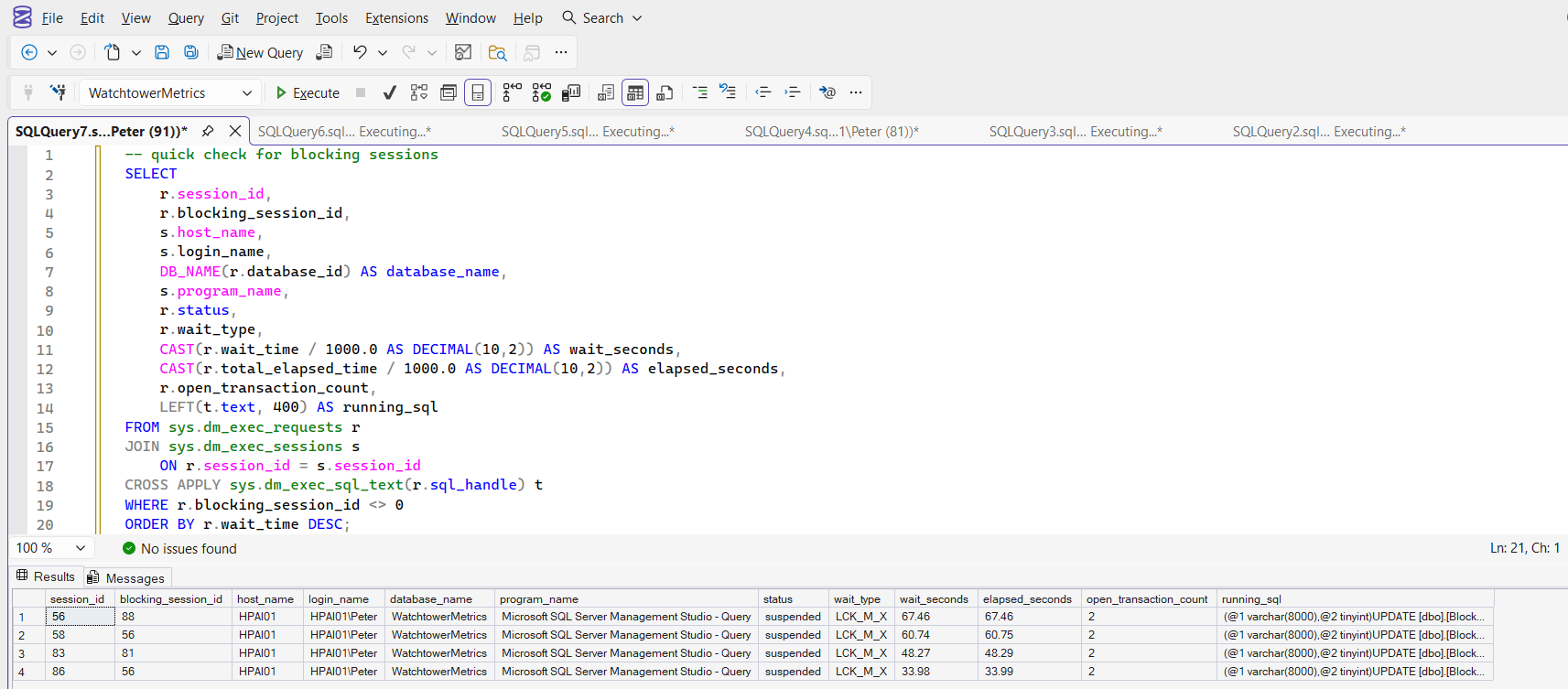
If this query is returning rows, it means those sessions are blocked. Focus on:
- High wait_seconds
- Non zero open_transaction_count
- Repeated blocking from the same SPID
If you see multiple sessions blocked by the same blocking_session_id, that is usually your starting point for investigation.
Script 2 – Identify the Lead Blocker
Once you know there is blocking, the next question is simple: Who is causing it?
The lead blocker is the session that is blocking others but is not itself blocked. Very often it is not running anything at all: an open transaction left behind in SSMS or by an application shows as sleeping, with no row in sys.dm_exec_requests. That is why this script starts from sys.dm_exec_sessions, keeps only sessions that nobody is blocking, and shows the last statement the session ran when there is no current one.
-- lead blocker inspection: sessions that block others and are not blocked themselves
WITH blockers AS
(
    SELECT blocking_session_id, COUNT(*) AS blocked_session_count
    FROM sys.dm_exec_requests
    WHERE blocking_session_id <> 0
    GROUP BY blocking_session_id
)
SELECT
    s.session_id,
    ISNULL(r.blocking_session_id, 0) AS blocking_session_id,
    s.host_name,
    s.login_name,
    DB_NAME(ISNULL(r.database_id, s.database_id)) AS database_name,
    s.program_name,
    ISNULL(r.status, s.status) AS status,          -- sleeping = idle with an open transaction
    r.wait_type,
    CAST(r.wait_time / 1000.0 AS DECIMAL(10,2)) AS wait_seconds,
    CAST(r.total_elapsed_time / 1000.0 AS DECIMAL(10,2)) AS elapsed_seconds,
    ISNULL(r.open_transaction_count, s.open_transaction_count) AS open_transaction_count,
    s.last_request_end_time,
    b.blocked_session_count,
    LEFT(ISNULL(t.text, lt.text), 400) AS running_or_last_sql
FROM blockers b
JOIN sys.dm_exec_sessions s
    ON s.session_id = b.blocking_session_id
LEFT JOIN sys.dm_exec_requests r
    ON r.session_id = s.session_id
LEFT JOIN sys.dm_exec_connections c
    ON c.session_id = s.session_id
OUTER APPLY sys.dm_exec_sql_text(r.sql_handle) t
OUTER APPLY sys.dm_exec_sql_text(c.most_recent_sql_handle) lt
WHERE ISNULL(r.blocking_session_id, 0) = 0
ORDER BY b.blocked_session_count DESC;
This isolates the session at the top of the blocking chain. A sleeping status with open_transaction_count of 1 or more is the classic shape: the work finished, the transaction never did.
Now you can see:
- What it is running
- Whether it has open transactions, and when its last request ended
- How long it has been executing
This is the session you make decisions about. Now you can start asking better questions:
- Is this expected workload?
- Is it part of a deployment?
- Is it an ad hoc SSMS query someone forgot about?
- Is there an open transaction holding locks?
Killing a blocked session achieves nothing. Always target the lead blocker if action is required.
If you need a wider live view of worker threads, waits, CPU usage, and session activity, see: Check Worker Threads and Active Sessions.
Locking vs Blocking
Locking is normal. SQL Server uses locks to maintain data integrity and transaction isolation.
Blocking is what happens when those locks prevent other sessions from moving forward. Every busy system has locking. Not every system has problematic blocking.
Sometimes blocking is brief and harmless. For example, queries that execute thousands of times per minute may briefly wait on each other under load. Individually those waits are small, but together they can look like slowness.
Persistent blocking chains are different. Those require investigation, and Microsoft’s Understand and Resolve SQL Server Blocking Problems is the reference for working one through.
You do not need to memorise the theory in the Transaction Locking and Row Versioning Guide, but you should understand that most blocking starts with an open transaction holding locks longer than expected.
Common Causes of Blocking
Blocking is rarely random. It usually comes down to:
- Long running transactions
- Ad hoc queries left running in SSMS
- Large updates or deletes without batching
- Missing indexes causing wide scans
- Application code not committing properly
Short blocking bursts can be normal. Persistent blocking chains are not.
When to Terminate a Blocking SPID
If a blocking session is causing real production impact and cannot be resolved quickly, you may need to terminate it.
Before doing that, read: How to Kill a SPID in SQL Server
Killing a SPID is sometimes necessary, but it should be the result of understanding the situation, not the first reaction.
What to Look for During an Incident
If you are on call and see blocking:
- Identify the lead blocker
- Check open_transaction_count
- Review the active statement
- Assess how long it has been running
- Decide whether it is safer to let it complete or terminate it
Blocking tells you something about workload behaviour. It is rarely just a random engine problem.
Understanding what is happening under the surface is what separates reacting to symptoms from fixing the real issue.
Once you can see the chain, these are the next questions on the same incident.
- DBA Scripts: Get Blocking Summary, the script version, every chain resolved to its lead in one run.
- DBA Scripts: Get Open Transactions, the sleeping session with a transaction nobody closed.
- How to Kill a SPID in SQL Server, read this before you KILL the lead blocker.
- DBA Scripts: Lock Escalation, Contention and Blocking Plans, when the same objects block every day.
- sp_who vs sp_who2 vs sp_whoisactive, the tools most DBAs reach for first, and what each one hides.
- DBA Scripts: Blocking and Locking, the hub for every blocking and locking script on this site.
Leave a Reply