
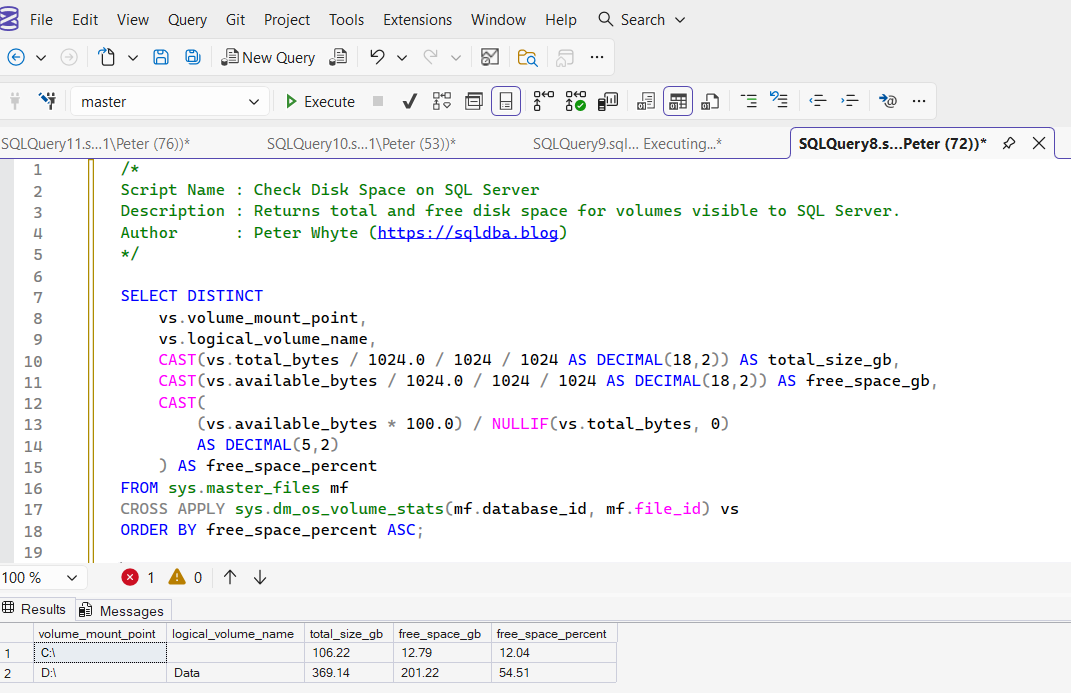
This script returns disk space information for volumes that host SQL Server database data or log files. It shows total size, available free space, and percentage free space per drive or mount point.
This is commonly used during storage pressure incidents, failed backups, restore troubleshooting, or proactive capacity reviews.
The Script
Example Output
The result set shows one row per volume that stores SQL Server data or log files, including total size in GB, free space in GB, and percentage free space.
Volumes with the lowest free space appear first, making it easy to identify potential capacity risks.
Important: This script only returns volumes that currently host database files. If a drive is not used for SQL Server data or log files, for example a dedicated backup-only drive, it will not appear in the results.
Notes
- Only shows volumes that host SQL Server database files
- Drives used solely for backups will not appear
- Useful during backup failures and restore troubleshooting
- Low percentage free space can cause autogrowth delays
- Should be monitored proactively in production environments
Leave a Reply