
While enabling show advanced options using sp_configure, I encountered an unexpected failure when executing RECONFIGURE:
Msg 5808, Level 16, State 1
Ad hoc update to system catalogs is not supported.
The change would not apply, and any further configuration attempts failed in the same way.
This issue typically appears on systems where older configuration settings have been modified and never reset. In most cases, the root cause is the legacy allow updates option being set incorrectly.
Why this Error Occurs
SQL Server still exposes a configuration option called allow updates.
It originates from SQL Server 2000, when direct updates to system tables were technically possible. From SQL Server 2005 onward, that capability was removed. Direct updates to system tables are not supported, and the setting no longer enables them.
Microsoft’s documentation makes two important points:
- The setting has no functional effect in modern SQL Server versions.
- Changing the allow updates option causes
RECONFIGUREto fail.
That second point is what triggers the behaviour above.
If allow updates has been set to 1 at some point in the past, any standard RECONFIGURE statement can fail, blocking configuration changes.
This most commonly surfaces when enabling:
- show advanced options
- xp_cmdshell
- Database Mail
- Installation or automation scripts that apply configuration changes
The key thing to understand is that this is not catalog corruption and not an engine fault. It is a deprecated configuration option interfering with normal behaviour.
Example of the Failure
When allow updates is set to 1, the following will fail:
EXEC sp_configure 'allow updates', 1;
RECONFIGURE;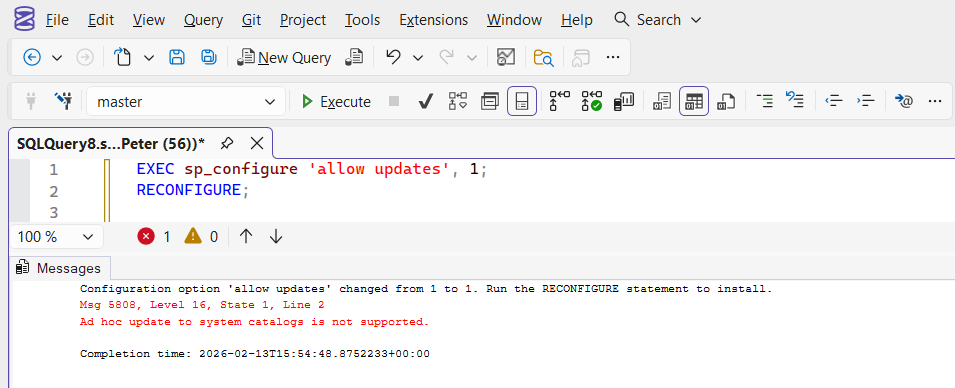
How to Fix the Error
There are two steps to resolving this cleanly.
Apply the configuration change
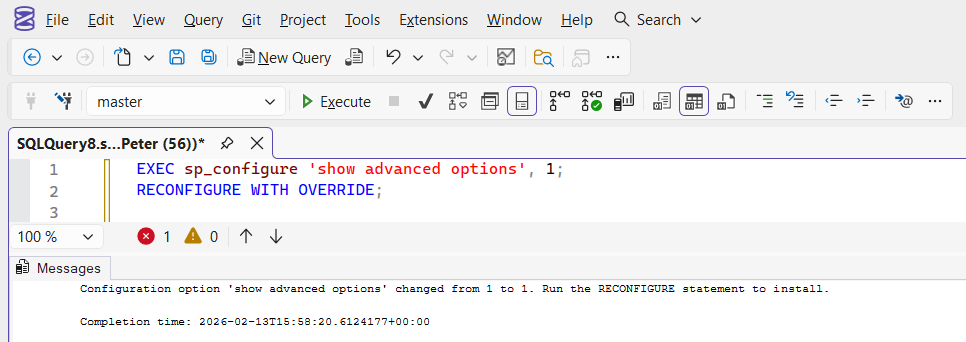
If you are enabling a feature such as show advanced options, use:
EXEC sp_configure 'show advanced options', 1;
RECONFIGURE WITH OVERRIDE;
Using WITH OVERRIDE allows the configuration change to be applied without triggering the error.
Reset allow updates to default
To prevent the issue from recurring, verify the current value:
EXEC sp_configure 'allow updates';If it is set to 1, reset it:
EXEC sp_configure 'allow updates', 0;
RECONFIGURE;
On supported versions of SQL Server, allow updates should remain 0. There is no operational reason to enable it.
Final Thoughts
This error can appear disruptive, but it is typically caused by an outdated configuration setting rather than a deeper engine issue.
If RECONFIGURE fails with “Ad hoc update to system catalogs is not supported” (Msg 5808), check the allow updates setting, apply changes using RECONFIGURE WITH OVERRIDE where appropriate, and reset the option back to its default.
Once understood, it’s a straightforward fix.
Leave a Reply