
Version history, with the support dates that actually matter
Every release from the 1989 OS/2 original to SQL Server 2025, what each one changed for the people running it, and which ones are still receiving security updates today. Lifecycle dates checked against the builds and lifecycle reference, which is regenerated after each patch release.
✓ Checked: 24 August 2026
Microsoft SQL Server is a relational database management system that has been through a remarkable number of lives since its first release in 1989. I have spent my career inside it, so this is not a summary of a Wikipedia page. It is the version history as the person on call experiences it.
For context on where I am writing from: I am a Database Reliability Engineer, officially a Site Reliability Engineer, looking after critical SQL Server databases with very different workloads and levels of importance. The most important instances run Enterprise Edition with Always On Availability Groups so the databases survive a disaster. Others, still important, run Web Edition, which operates without SQL Server Agent.
If you read one line of this page, read this one: SQL Server 2016 left extended support on 14 July 2026. Anything still running it receives no free security updates, and that is the version most likely to still be sitting quietly in an estate.
Every Version at a Glance
| Version | Engine | The change that mattered | Support |
|---|---|---|---|
| SQL Server 2025 2025 |
17.0 | Vector types and AI functions, Fabric mirroring | Mainstream to Jan 2031 |
| SQL Server 2022 2022 |
16.0 | Azure integration; Native Client removed | Mainstream to Jan 2028 |
| SQL Server 2019 2019 |
15.0 | PolyBase to external sources, Big Data Clusters | Extended to Jan 2030 |
| SQL Server 2017 2017 |
14.0 | Linux support; first CU-only release | Extended to Oct 2027 |
| SQL Server 2016 2016 |
13.0 | Query Store, Always Encrypted, Row Level Security | Ended 14 Jul 2026 |
| SQL Server 2014 2014 |
12.0 | In-memory OLTP (Hekaton), backup encryption | Ended 9 Jul 2024 |
| SQL Server 2012 2012 |
11.0 | Always On Availability Groups | Ended 2022 |
| SQL Server 2008 R2 2010 |
10.50 | Master Data Services; last Itanium release | Ended 2019 |
| SQL Server 2008 2008 |
10.0 | Data and backup compression, TDE | Ended 2019 |
| SQL Server 2005 2005 |
9.0 | Database Mirroring, CLR, XML, SSMS | Ended 2016 |
| SQL Server 2000 2000 |
8.0 | DTS (SSIS from 2005) and Reporting Services | Ended 2013 |
| 1.0 – 7.0 1989–1998 |
1–7 | OS/2 origins, the move to Windows NT, the Sybase split | Long gone |
Extended security fixes only
Out of support no free security updates
The Supported Versions
These are the releases you can still legitimately run. Everything below this section is history.
SQL Server 2025 — version 17.0
The current release, and the one that takes SQL Server somewhere genuinely new: vector data types and vector indexes, AI_GENERATE_EMBEDDINGS, and integration with external AI models, so similarity search happens in the database rather than in a separate vector store.
Around that: Microsoft Fabric mirroring for near-real-time analytics, deeper Azure Arc connectivity for hybrid management, regular expression functions in T-SQL, JSON indexes, and GitHub Copilot inside SSMS. It also adds a Standard-based Developer edition alongside the Enterprise-based one, which makes building a test rig less of a licensing puzzle.
SQL Server 2022 — version 16.0
2022 is the Azure-facing release: Azure Synapse Link for near-real-time analytics without building an ETL pipeline, object storage integration for S3-compatible targets, and Data Lake virtualisation, so CREATE EXTERNAL TABLE AS SELECT can write straight out to a data lake.
Two changes that catch people during upgrades, both worth checking before you plan one:
- The R, Python and Java runtimes are no longer installed by SQL Setup. You install the runtimes you want, separately.
- SQL Server Native Client was removed.
SQL Server 2019 — version 15.0
2019 pushed PolyBase well beyond its Hadoop origins: external tables could now query SQL Server, Oracle, Teradata, MongoDB and generic ODBC sources, which made SQL Server a reasonable front door to data it does not own. It also brought In-Memory Database technologies and a long list of engine improvements.
Big Data Clusters shipped here too, and have since been retired, which is a useful reminder that the newest feature in a release is not always the one to build on.
SQL Server 2017 — version 14.0
The release that put SQL Server on Linux, which still surprises people who have not looked in a while. The engine is the same one; the differences are in the tooling around it and a handful of features.
It also brought Automatic Database Tuning, Scale Out for SSIS, and OpenAPI-compliant REST support in SSRS. SQL Server R Services was renamed Machine Learning Services to reflect Python support alongside R, bringing libraries like revoscalepy and microsoftml and Python operationalisation from T-SQL.
SQL Server 2016 — version 13.0 Out of support
I would argue 2016 is the best-value release in the product’s history, which makes its retirement worth taking seriously. It delivered:
- Query Store, which turned performance troubleshooting from opinion into evidence
- Always Encrypted, Dynamic Data Masking and Row Level Security
- Native JSON support for import, export, parsing and storage
- PolyBase query integration with Hadoop and Azure Blob storage
- Stretch Database for archiving to Azure, since retired
- R Services integration
- Backup compression in Standard Edition, previously Enterprise-only
It also began Microsoft’s move away from Service Packs and dropped 32-bit support, becoming x64-only.
The History Before That
1988–1998 Sybase, OS/2 and the split
In June 1988, Microsoft, Ashton-Tate and Sybase collaborated on a variant of Sybase SQL Server for IBM’s OS/2. That is the birth of Microsoft SQL Server, and of Microsoft’s move into an enterprise database market then dominated by Oracle and IBM. The first version shipped in 1989.
The turning point was 1993, when SQL Server moved to Windows NT and Microsoft and Sybase went their separate ways. SQL Server 6.0 (1995) was the first version designed specifically for Windows NT. SQL Server 7.0 (1998) was a major rewrite of the Sybase engine, introducing User Mode Scheduling and multi-dimensional database products, ending support for the DEC Alpha platform, and laying the foundation for the high availability work that followed.
You will never be asked to support any of this, but its fingerprints are everywhere: the sp_ procedure naming, sp_who, and the general shape of T-SQL all date from these years.
2000–2010 Becoming a platform
SQL Server 2000 (8.0) still built on Sybase code, added IA-64 support, and introduced two systems that outgrew the database itself: Data Transformation Services, which became SSIS in 2005, and Reporting Services.
SQL Server 2005 (9.0) is the release that shaped the modern job. Native XML support, CLR integration, and Database Mirroring for high availability. It also replaced Enterprise Manager and Query Analyzer with SQL Server Management Studio. If you live in SSMS, you live in a 2005 idea that has been rebuilt several times since, most recently onto the Visual Studio shell.
SQL Server 2008 (10.0) brought self-tuning and self-organising data management, support for structured and semi-structured data, better compression, Transparent Data Encryption, and improved indexing algorithms. SQL Server 2008 R2 (10.50) added Master Data Services and Multi-Server Management, and was the last release to run on Itanium.
2012–2014 High availability grows up
SQL Server 2012 (11.0) introduced Always On Failover Cluster Instances and Availability Groups, and that is the single change that most altered what a DBA does day to day. Before it, high availability meant clustering or mirroring with real limitations. After it, Availability Groups became the default answer, bringing with them readable secondaries, listeners, quorum models and a whole discipline of failover testing. It was also the last version to natively support OLE DB.
SQL Server 2014 (12.0) added in-memory OLTP (Hekaton) and improved Always On further, along with backup encryption. It was the last version available on x86/IA32. Extended support ended 9 July 2024.
What This Means for Your Estate
Version history is interesting. Support dates are the part that turns into an audit finding.
| If you are running | Where you stand | What to do |
|---|---|---|
| 2014 or older | No free security updates, for years | Upgrade path, urgently |
| 2016 | Unsupported since 14 Jul 2026 | ESUs, Azure, or upgrade |
| 2017 or 2019 | Security fixes only | Stay on the GDR builds; plan the move |
| 2022 or 2025 | Fully supported | Keep current with CUs |
Not sure what you are on? Start here:
SELECT @@VERSION;

-- or just the parts you need
SELECT SERVERPROPERTY('ProductVersion') AS Build,
       SERVERPROPERTY('ProductLevel')   AS Level,
       SERVERPROPERTY('Edition')        AS Edition;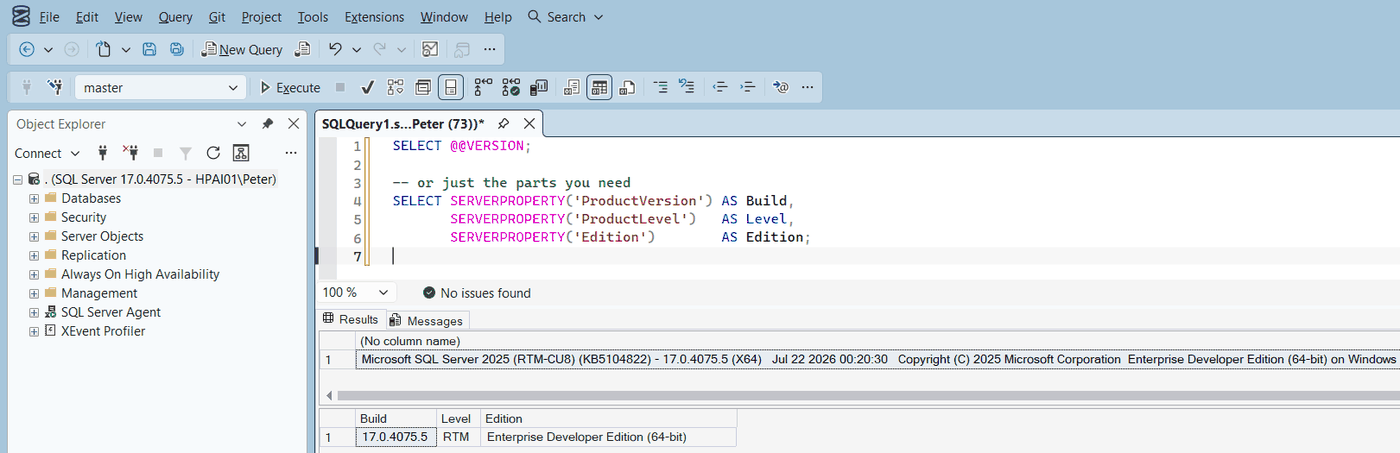
@@VERSION for the full string, SERVERPROPERTY for just the build, level and edition.The build number that comes back maps straight onto the builds and lifecycle reference, which will tell you exactly which CU it is, how far behind it sits, and when its clock runs out. There is also a short guide to checking the version several different ways.
Keeping SQL Server current is one of the most common challenges I see in businesses: staying inside Microsoft’s support window for security, and applying Cumulative Updates regularly for stability and performance. Neither happens by accident, and both are easier to argue for with a support-end date in front of you.
Frequently Asked Questions
Which SQL Server versions are still supported?
SQL Server 2022 and 2025 are in mainstream support. 2017 and 2019 are in extended support, receiving security fixes only, until October 2027 and January 2030. Everything older is out of support, including 2016 since 14 July 2026.
What does 13.0 mean compared to “SQL Server 2016”?
The year is the marketing name; the engine version is what the product reports. 2016 is 13.0, 2017 is 14.0, 2019 is 15.0, 2022 is 16.0 and 2025 is 17.0. Build numbers use the engine version, which is why a build like 16.0.4265.3 is a SQL Server 2022 build.
When did SQL Server stop shipping Service Packs?
SQL Server 2017 was the first Cumulative-Update-only release. SQL Server 2016 was the last version with Service Packs in practice, finishing at SP3.
Can SQL Server really run on Linux?
Yes, since SQL Server 2017. It is the same engine, with differences in the surrounding tooling and a few features. It is a genuine option for new builds rather than a curiosity.
What happens when a version goes out of support?
Free security updates stop. The database keeps running, which is exactly why this gets missed. The supported routes are Extended Security Updates (paid, or included when the workload runs in Azure) or an upgrade to a supported version.
Which release changed the DBA job the most?
SQL Server 2012 with Always On Availability Groups, and SQL Server 2016 with Query Store a close second. Availability Groups changed how estates are built and failed over; Query Store changed performance troubleshooting from opinion into evidence.
Related
- SQL Server Builds: Complete Version List and Support Lifecycle, every build, CU, KB and support date, kept current
- How to Check SQL Server Version
- SSMS: The Complete Guide, the tool that arrived with SQL Server 2005
- DBA Scripts: The Complete Guide
- The SQL Server Error Library
Summary
SQL Server went from an OS/2 product built on Sybase code to a cross-platform engine with vector search built in. The releases that changed the job most were 2005 (SSMS and mirroring), 2012 (Availability Groups) and 2016 (Query Store). The one that needs your attention right now is also 2016: extended support ended on 14 July 2026, so anything still running it is unpatched. Know what you are on, and know when its clock runs out.
Leave a Reply