
HADR_SYNC_COMMIT appears exclusively on Always On Availability Group primary replicas configured with at least one synchronous commit secondary. With synchronous commit, the primary cannot acknowledge a transaction commit to the application until the log records for that transaction have been written and hardened on all synchronous secondaries. HADR_SYNC_COMMIT is the time spent waiting for that confirmation.
If you don’t use Always On Availability Groups, or all your AG secondaries are asynchronous, you will never see this wait type.
Is This Wait Expected?
Some HADR_SYNC_COMMIT is the inherent cost of synchronous replication. Every committed transaction on a synchronous AG primary includes this wait as part of its commit path. The question is whether the wait is proportionate.
On a well-configured AG with both replicas in the same data centre on a fast network:
HADR_SYNC_COMMITshould be low in absolute terms (sub-millisecond per commit)- It may appear in your top 10 wait types but with small
avg_wait_ms - That’s normal
It’s a problem when:
avg_wait_msis elevated (above 2–5ms per commit consistently)- It’s your #1 or #2 wait type with a large
pct_total_wait - Application latency for write operations is noticeably higher than expected
- Users report slow response on insert/update/delete operations despite good hardware
Treat the numbers above as starting points, not limits. Baseline this wait on your own hardware during a normal week; the thresholds worth acting on are the ones your workload proves.
What The Commit Path Looks Like
Understanding the flow helps locate where the lag is:
Application issues COMMIT
  → Primary writes log records to log buffer  (WRITELOG wait - primary log disk)
  → Primary sends log block to secondary       (network)
  → Secondary receives and writes to log disk  (secondary log disk)
  → Secondary sends acknowledgement back       (network)
  → Primary receives ack                       (HADR_SYNC_COMMIT wait ends)
  → Application receives COMMIT confirmation
Any bottleneck in this chain increases HADR_SYNC_COMMIT on the primary.
Root Causes
Network latency between primary and secondary, the single most common cause. Every commit round-trip includes two network hops (send + ack). A 5ms network round-trip time means every commit takes at least 5ms of HADR_SYNC_COMMIT wait, regardless of how fast the disks are. Secondaries in remote data centres, connected via WAN or VPN, will always produce higher HADR_SYNC_COMMIT than co-located secondaries.
Slow secondary log disk, the secondary must write incoming log records to its own log file before acknowledging. If the secondary’s log disk is slow (different storage tier, shared storage, spinning disk), the ack takes longer. This is separate from the primary’s log disk, you can have fast primary storage and slow secondary storage.
Secondary under CPU or I/O load, a secondary that’s busy serving read traffic (a readable secondary) or running other workloads (DBCC, backups, indexing) may have delayed redo and delayed log hardening. Under heavy load, log hardening can queue behind other I/O.
Log block size and commit frequency, very high-frequency, small transactions generate many small log blocks, each requiring a round-trip. Batching commits (fewer, larger transactions) reduces the number of round-trips even if total log volume is similar.
Multiple synchronous secondaries, the primary waits for all synchronous secondaries to acknowledge. If you have two synchronous secondaries and one is slow, the primary waits for the slower one every time.
How To Diagnose It
Find the lagging replica:
SELECT
    ar.replica_server_name,
    ar.availability_mode_desc,
    ars.synchronization_state_desc,
    ars.log_send_queue_size         AS send_queue_kb,
    ars.log_send_rate               AS send_rate_kbps,
    ars.redo_queue_size             AS redo_queue_kb,
    ars.redo_rate                   AS redo_rate_kbps,
    ars.last_sent_time,
    ars.last_received_time,
    ars.last_hardened_time,
    ars.last_redone_time,
    DATEDIFF(ms, ars.last_hardened_time, GETDATE()) AS ms_since_last_hardened
FROM sys.dm_hadr_database_replica_states ars
JOIN sys.availability_replicas ar
    ON ar.replica_id = ars.replica_id
WHERE ars.is_local = 0  -- secondary replicas only
ORDER BY ars.log_send_queue_size DESC;
Key columns:
send_queue_kb > 0, primary has log that hasn’t been sent to the secondary yet. Network or secondary receive backlog.redo_queue_kb > 0, secondary has received log but hasn’t hardened it yet. Secondary I/O is the bottleneck.ms_since_last_hardenedgrowing over time, the secondary is falling behind on hardening.
Check network round-trip time between primary and secondary:
On the primary, ping the secondary server and measure the round-trip time. For synchronous commit, network latency directly adds to HADR_SYNC_COMMIT wait time. A 10ms ping means a minimum of 10ms per commit.
Check secondary log disk write latency, run the I/O stats query on the secondary:
-- Run this on the SECONDARY
SELECT
    DB_NAME(vfs.database_id)    AS database_name,
    mf.type_desc,
    mf.physical_name,
    CASE WHEN vfs.num_of_writes > 0
         THEN CAST(vfs.io_stall_write_ms * 1.0 / vfs.num_of_writes AS decimal(10,1))
         ELSE 0
    END AS avg_write_ms
FROM sys.dm_io_virtual_file_stats(NULL, NULL) vfs
JOIN sys.master_files mf
    ON mf.database_id = vfs.database_id AND mf.file_id = vfs.file_id
WHERE mf.type_desc = 'LOG'
ORDER BY avg_write_ms DESC;
High avg_write_ms on the secondary confirms the secondary log disk is the bottleneck.
What To Do
If it’s a network latency problem:
- Co-locate synchronous secondaries, same data centre, same network segment, same rack if possible
- For secondaries that must be remote (DR in a different city): evaluate whether asynchronous commit is acceptable for that replica. Asynchronous commit eliminates
HADR_SYNC_COMMITfor that replica entirely, at the cost of potential data loss on failover (RPO > 0). You can have one synchronous secondary local and one asynchronous secondary remote.
If it’s a slow secondary log disk:
- Move the secondary log file to faster storage, ideally matching the primary’s storage tier
- Ensure the secondary log disk isn’t shared with other high-I/O workloads
If the secondary is a readable secondary under load:
- Review the read workload going to the secondary, heavy reporting queries during peak hours can degrade secondary I/O and redo performance
- Consider Resource Governor on the secondary to limit read workload resource consumption
- Schedule heavy reports for off-peak hours
If it’s commit frequency:
- Batch transactions where the application allows, reduce the number of individual commits
- Review application code for row-by-row commit loops
Related Scripts
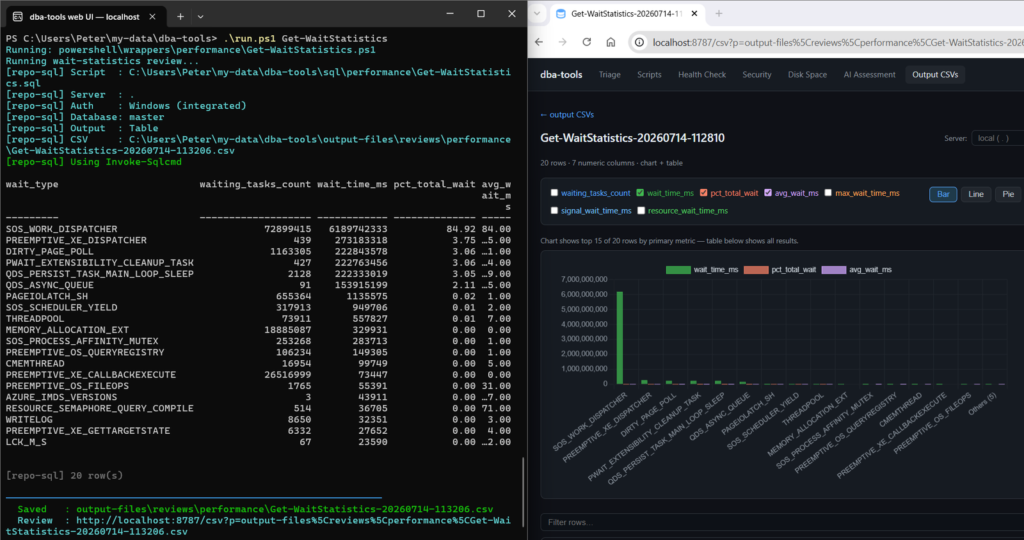
Get-WaitStatistics, the overview script; HADR_SYNC_COMMIT appears only on AG primariesWRITELOG, often elevated alongside HADR_SYNC_COMMIT; the primary log path is a related bottleneck
Leave a Reply