
Modern SQL Server environments often use encrypted connections by default, but that does not always mean what people think it means.
When troubleshooting connectivity problems, certificate errors, performance questions, or unexpected client behaviour, DBAs usually need to answer one very specific question:
What protocol and encryption is this connection actually using right now?
This post shows how to verify connection encryption and protocol at runtime using SQL Server itself, rather than relying on client settings or configuration assumptions.
Why This Matters
Over recent SQL Server releases, alongside newer SSMS versions and client drivers, connection behaviour has changed.
In practice, this means:
- Connections may be encrypted even when encryption was never explicitly configured
- Certificate trust issues surface more frequently
- Different tools behave differently against the same instance
- Encryption can vary between connections on the same server
Although this behaviour is often noticed during SQL Server 2025 upgrades, the underlying change is usually on the client side. Newer versions of SSMS and SQL client drivers request encryption by default, which exposes certificate and trust issues that may have existed for years.
Looking at configuration alone is no longer enough. To understand what is really happening, you need to inspect live connections.
Check Encryption and Protocol for Your Current Session
This query shows exactly how your current connection is established, using the sys.dm_exec_connections dynamic management view.
-- Show protocol, encryption, and authentication for the current session
SELECT
    protocol_type,
    encrypt_option,
    auth_scheme,
    local_net_address,
    local_tcp_port
FROM sys.dm_exec_connections
WHERE session_id = @@SPID;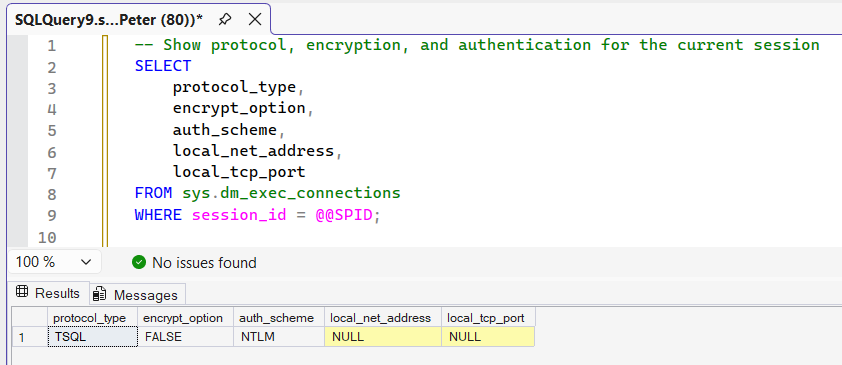
It returns:
- protocol_type
TCP, Shared Memory, or Named Pipes - encrypt_option
TRUE or FALSE, the actual encryption state in use - auth_scheme
Windows, SQL, Kerberos, and related authentication methods - local_tcp_port
The port SQL Server is listening on for this connection
If you also need to confirm which server IP address your session connected to (not just the port), see: How to Get the SQL Server IP Address.
This is the fastest and most reliable way to confirm what is really happening on the wire.
If encrypt_option shows FALSE, it simply means this connection is not encrypted.
This is common for:
- Local Shared Memory connections
- Older clients or drivers
- Instances where encryption is optional rather than required
Encryption is not automatically forced by SQL Server unless it is explicitly configured. To require encrypted connections, SQL Server must be configured to force encryption and present a valid certificate trusted by the client.
This post focuses on verifying connection state, not enforcing it. Certificate-based encryption configuration is covered separately.
Check Encryption Across All Connections
To see how clients are connecting across the entire instance:
-- Show protocol and encryption usage across all active connections
SELECT
    protocol_type,
    encrypt_option,
    COUNT(*) AS connection_count
FROM sys.dm_exec_connections
GROUP BY protocol_type, encrypt_option
ORDER BY protocol_type, encrypt_option;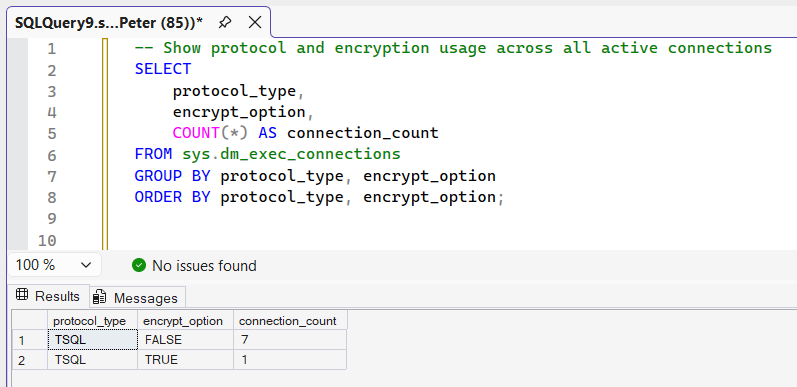
This is useful when:
- Some applications connect successfully and others fail
- You suspect mixed client or driver versions
- You are validating behaviour after upgrades or patching
- You want to confirm how widely encryption is being used
It gives you a view of actual connection behaviour, not intent.
It is normal to see a mix of encrypted and unencrypted connections on the same instance.
For example, SSMS or application connections using newer drivers may be encrypted, while local administrative connections use Shared Memory and remain unencrypted. This reflects client behaviour, not an inconsistency in SQL Server itself.
Common Things You Will See
In modern environments, it is normal to observe:
- TCP connections reporting
encrypt_option = TRUEwithout explicit server configuration - Certificate errors from newer clients connecting to older instances
- Different encryption behaviour between SSMS, sqlcmd, and application drivers
- Local Shared Memory connections that are not encrypted
None of these indicate a bug. They are the result of newer client defaults and stricter security behaviour.
If you are seeing certificate trust errors when connecting with newer versions of SSMS, this is typically related to how encryption is negotiated and whether the client trusts the server certificate. That scenario is covered in more detail here: SSMS Certificate Chain Not Trusted Error (Trust Server Certificate Fix)
What This Does Not Tell You
This DMV shows connection state, not configuration intent.
It does not tell you:
- Whether encryption is required or optional
- Which certificate SQL Server is presenting
- Whether the client trusts that certificate
- Whether encryption was negotiated or forced
Those questions belong to certificate configuration and client tooling, not runtime inspection.
When DBAs Should Check This
This check is most useful during:
- Certificate or TLS-related connection failures
- SSMS or sqlcmd version changes
- Application connectivity incidents
- Security or compliance reviews
- Validation after patching or driver updates
It should be part of your standard troubleshooting muscle memory.
Final Notes
Encryption defaults have changed, and assumptions that held true for years no longer do.
Rather than debating settings or relying on client options, check what SQL Server is actually doing.
This DMV shows the truth.
Leave a Reply