
Data retention in SQL Server usually means deleting old data in a controlled and repeatable way.
That might be driven by compliance requirements, table growth that’s starting to hurt performance, SQL Server Express size limits, or simply keeping log and audit tables under control.
Whether this is a one-off cleanup or a permanent maintenance task, the approach matters more than the delete itself.
This post focuses on applying data retention safely, without unexpected blocking, log growth, or recovery surprises.
Define the Retention Rule
Before touching any data, be clear about the rule.
Examples:
- Keep the last 90 days of application logs
- Retain seven years of order history
- Remove error records older than 30 days
Retention rules should be:
- Time based where possible
- Easy to explain
- Easy to enforce consistently
If you cannot express the rule clearly in a WHERE clause, stop and fix that first.
Identify Large Tables First
Retention work usually starts by identifying which tables are actually worth cleaning up.
One of the fastest ways to do this is using the built-in Disk Usage by Top Tables report in SSMS.
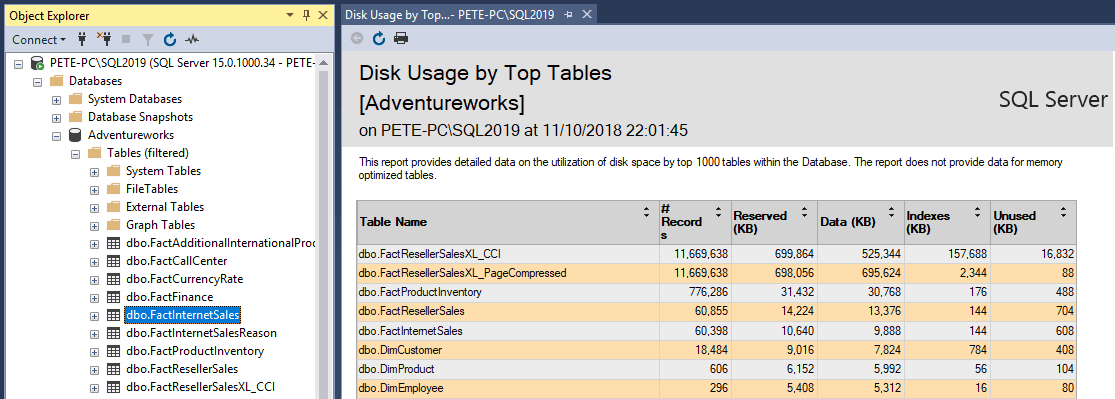
This report quickly shows:
- Which tables consume the most space
- Whether growth is data-driven or index-driven
- Good candidates for retention policies
👉 SSMS Disk Usage by Top Tables Report
Use this when you need a fast, visual way to spot oversized tables.
👉 Checking Table Sizes in SQL Server
Placeholder: future post covering all reliable ways to measure table size and growth.
Understand How Much Data Will Be Removed
Before deleting anything, measure the scope of the change.
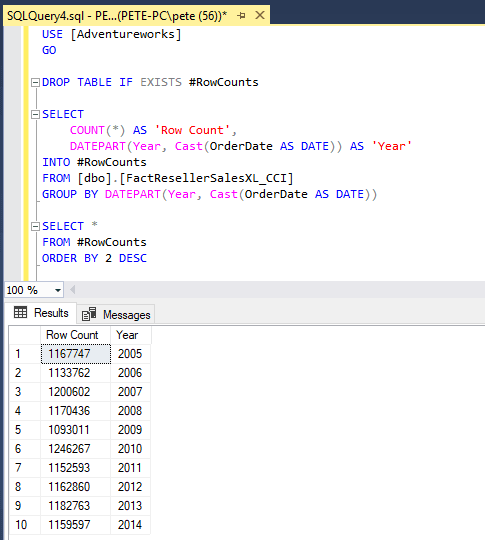
A simple grouped count by date is usually enough to understand scale and progress.
SELECT
    CAST(DateColumn AS date) AS [Date],
    COUNT(*) AS RowCount
FROM dbo.YourTable
GROUP BY CAST(DateColumn AS date)
ORDER BY [Date];
This gives you:
- A clear view of how much data exists per period
- A way to validate progress during the cleanup
- A baseline you can compare against after the delete
Delete Data in Controlled Batches
Large retention deletes should never run as a single transaction.
Use a batch delete loop so you can control impact and react if something does not look right.
The batch delete pattern itself is covered here:
👉 Deleting Rows in Batches in SQL Server
Use this pattern to keep transactions small and predictable.
Your retention rule simply becomes the predicate.
DELETE TOP (@BatchSize)
FROM dbo.YourTable
WHERE DateColumn < '2012-01-01';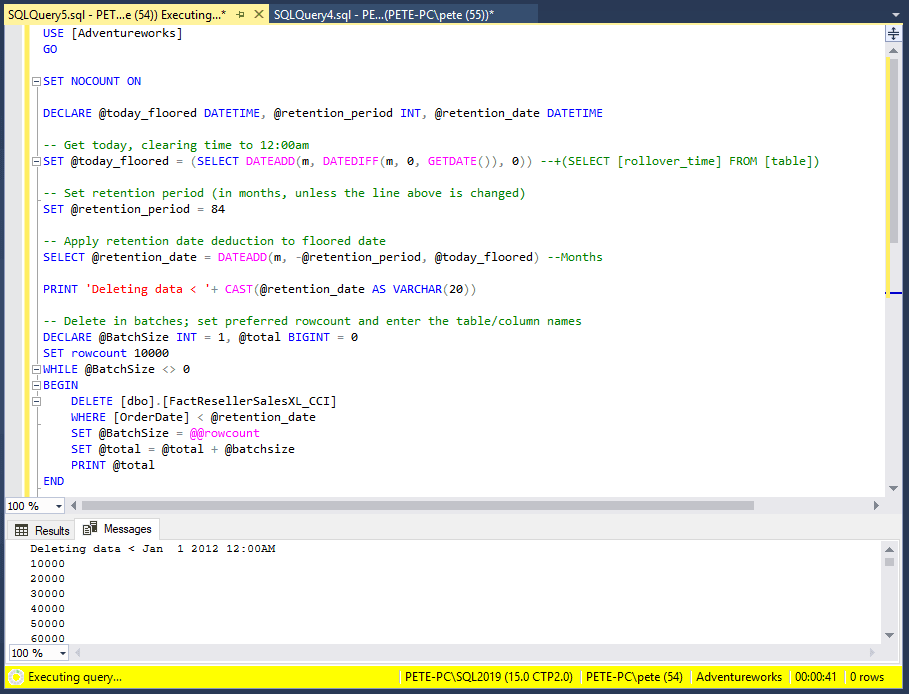
Verify as You Go
Retention deletes should be observable, not fire-and-forget.
Re-run the same grouped counts you captured earlier and compare the results.
You are looking for:
- Row counts decreasing in the expected date ranges
- No unexpected gaps or spikes
- Steady progress over time
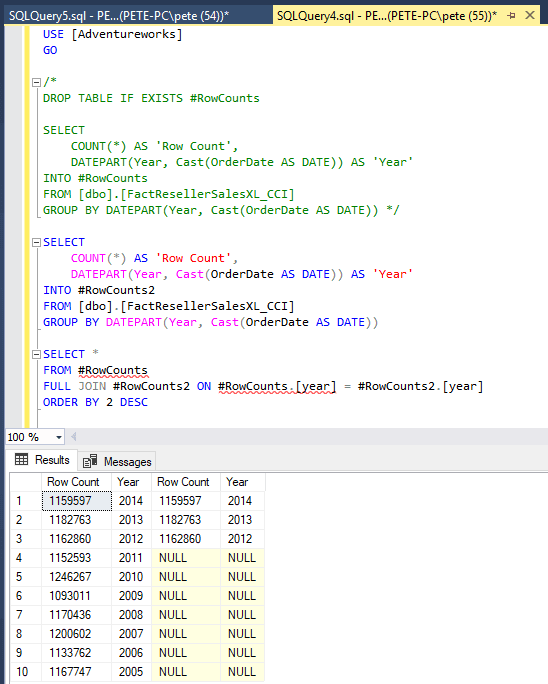
Verification is what turns a delete into a controlled operation instead of a blind one.
Schedule Ongoing Retention
Once the initial cleanup is complete, retention should become routine.
In most environments this means:
- A SQL Agent job
- Running during low traffic windows
- Using the same batch pattern
- Alerting on failures or abnormal runtime
Retention jobs should be boring. If they are exciting, something is wrong.
Operational Considerations
A few practical reminders that come up repeatedly:
- Index impact
Large deletes fragment indexes. Review fragmentation afterwards and fix what needs fixing. - Transaction logs
Batch deletes still generate log records. Ensure log backups are running and monitor usage during the job. - Foreign keys and cascades
Retention rules must respect dependencies or deletes will block or fail. - Assumptions about speed
Slower deletes are often safer deletes. Runtime is rarely the real problem.
👉 How to Check Transaction Log Space Usage in SQL Server
Use this to monitor log usage during retention deletes.
Final Thoughts
Data retention is not about deleting data quickly.
It is about removing the right data, in the right order, with enough visibility to stop if something looks wrong.
When you combine a clear retention rule with controlled batch deletes and proper verification, retention becomes just another predictable maintenance task instead of a risky operation.
Leave a Reply