
Database Mirroring is deprecated, but you will still see it in many production environments.
It was officially marked deprecated in SQL Server 2012 and has remained in that state for well over a decade. In my own career as a DBA, it has been “deprecated” the entire time, yet still widely deployed and fully supported.
Like several other SQL Server features, deprecation does not mean immediate removal. It means no future investment.
If you inherit a mirrored environment, you need to know how to support it.
When mirroring breaks, databases typically show as:
DISCONNECTEDSUSPENDEDIN RECOVERYUNSYNCHRONIZED
For reference, see Microsoft’s official Database Mirroring (SQL Server) documentation.
This post walks through a production troubleshooting approach based on real-world scenarios.
Step 1 – Check the Current State
Start here:
-- Check mirroring health state
SELECT
    DB_NAME(database_id) AS database_name,
    mirroring_role_desc,
    mirroring_state_desc,
    mirroring_safety_level_desc,
    mirroring_partner_name,
    mirroring_witness_name,
    mirroring_witness_state_desc
FROM sys.database_mirroring
WHERE mirroring_guid IS NOT NULL;
This is the same check Get Mirroring Endpoint Health and Status runs, packaged with the endpoint check below as one script if you’d rather not paste this by hand every time.
The value in mirroring_state_desc is what decides your next move. Microsoft documents the full set in sys.database_mirroring:
| State | What it means | What to do |
|---|---|---|
SYNCHRONIZED | The partners are synchronized, so failover is possible. | Nothing. This is the state you are working back towards. |
SYNCHRONIZING | The mirror is applying log records and has not caught up yet. Normal straight after a resume or a burst of write activity. | Wait, and watch the redo queue fall. If it climbs instead, the mirror or the link cannot keep up. |
UNSYNCHRONIZED | The partners are connected but not synchronized, so failover is not possible right now. | Treat it as a live risk to your failover, not a cosmetic state. Work Step 4 before Step 6. |
PENDING_FAILOVER | A failover is in progress and the session is mid role switch. | Let it finish. Confirm the roles afterwards with the query above. |
SUSPENDED | Mirroring is paused. The principal keeps every log record while it lasts, so the transaction log cannot truncate. | Resume it (Step 2). If the log has grown, deal with that once the session is back. |
DISCONNECTED | The partner cannot be reached at all. | Endpoint and network first, Step 3 then Step 4. Check both servers, not just the one that alerted. |
If databases are DISCONNECTED, check the SQL Server error log on both principal and mirror.
Common error log patterns:
- Transport-level errors
- Endpoint authentication failures
- Certificate issues
- Login failures
- Port connectivity failures
Check both sides. Mirroring issues rarely exist on just one server.
Step 2 – Quick Reset: Suspend / Resume
If only one or a few databases are affected, this is normally the first thing to try.
-- Suspend & resume Mirroring for a database
ALTER DATABASE [YourDatabase] SET PARTNER SUSPEND;
ALTER DATABASE [YourDatabase] SET PARTNER RESUME;
In many cases, this clears a transient network interruption and synchronization resumes.
If it comes back clean:
- Monitor log send queue size
- Monitor redo queue size
- Confirm it stabilises in
SYNCHRONIZED
If it drops again shortly after, you likely have an infrastructure issue.
Suspend/Resume resets the session. It does not fix root cause. If it works once but fails again, treat that as a signal of underlying instability.
Step 3 – Verify the Mirroring Endpoint
Mirroring depends entirely on the database mirroring endpoint.
Check its state and port:
-- Check Mirroring Endpoint health state
SELECT
    e.name AS Endpoint_Name,
    e.state_desc AS Endpoint_State,
    tcp.port AS Port_Number,
    d.is_encryption_enabled AS Encryption_Enabled,
    d.encryption_algorithm_desc AS Encryption_Algorithm_Desc,
    d.certificate_id AS Certificate_Id
FROM sys.endpoints e
JOIN sys.database_mirroring_endpoints d
    ON e.endpoint_id = d.endpoint_id
JOIN sys.tcp_endpoints tcp
    ON e.endpoint_id = tcp.endpoint_id;
You want: Endpoint_State = STARTED
If the endpoint is STOPPED or DISABLED, mirroring cannot communicate. If it is not STARTED, run the following:
-- Restart Mirroring Endpoint
ALTER ENDPOINT [YourEndpointName] STATE = STOPPED;
ALTER ENDPOINT [YourEndpointName] STATE = STARTED;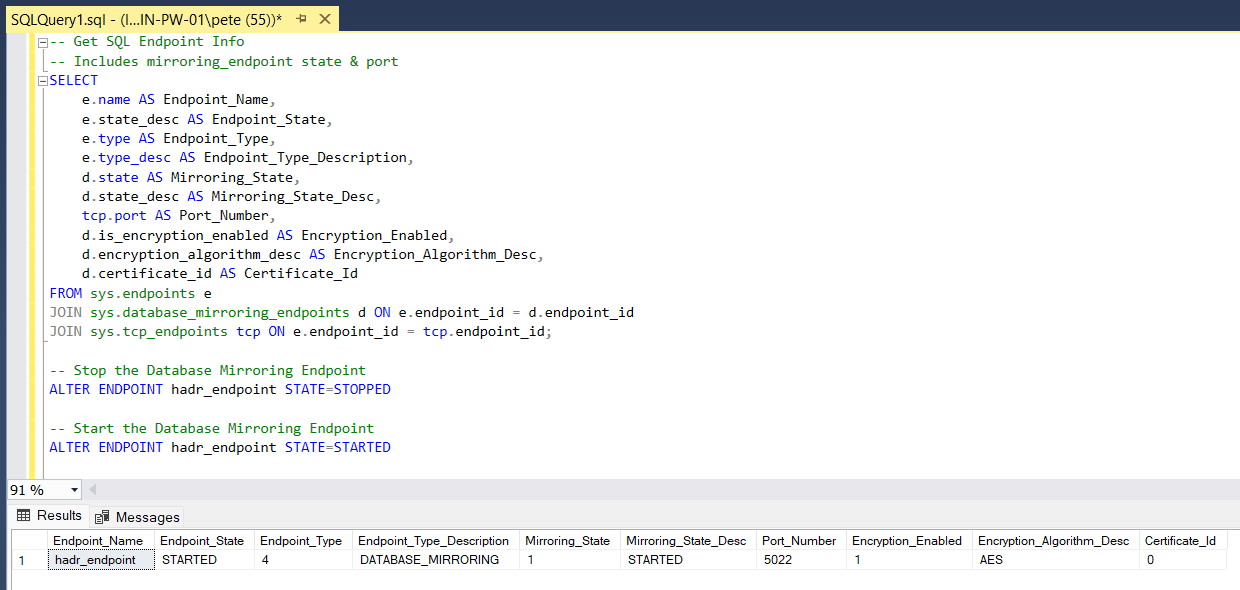
If the endpoint refuses to start, check:
- Service account permissions
- Certificate configuration
- Port conflicts
- Windows Firewall rules
- Recent SQL service restarts
Mirroring commonly uses port 5022, but confirm the actual port from the query.
For a quick reference of default SQL-related ports, see: SQL Server Default Ports.
Step 4 – Test Network Connectivity
Mirroring is sensitive to network instability.
If you need a structured walkthrough for validating port connectivity between servers, see: Testing Remote Server Port Connectivity with PowerShell.
From Principal to Mirror:
Test-NetConnection -ComputerName MirrorServer -Port 5022From Mirror to Principal:
Test-NetConnection -ComputerName PrincipalServer -Port 5022If this fails, check the following:
- Firewall Rules
- Security Groups
- Network ACLs
- Any other security appliances
- DNS resolution issue
- Port changes
Also confirm TCP/IP is enabled on both replicas. See: Enabling TCP Connections in SQL Server.
Run a continuous ping during suspected instability periods to detect packet loss or intermittent drops. Mirroring does not tolerate unstable links well. Even brief packet loss can trigger a disconnect.
Step 5 – Restart the Mirror Instance
If the mirror instance looks unhealthy:
- Restart the SQL Server service on the mirror
- Or reboot the mirror host
This does not affect the principal workload.
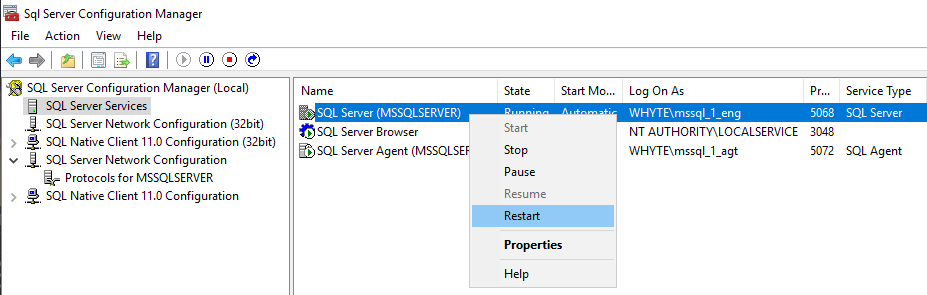
After restart:
- Confirm endpoint is STARTED
- Confirm databases move back to
SYNCHRONIZING
If they remain IN RECOVERY, review error logs again before doing anything else.
Step 6 – Reconfigure Mirroring (Last Resort)
If synchronization cannot be restored, you may need to remove and rebuild mirroring.
Typical process:
- Full backup of principal
- Log backup
- Restore full WITH NORECOVERY on mirror
- Restore log WITH NORECOVERY
- Re-establish mirroring
Before going down this path, confirm:
- Network stability
- Endpoint health
- Matching patch levels
- Valid certificates
- No storage issues
Ensure both replicas are on consistent and supported build levels. See: How to Check SQL Server Version.
Rebuilding mirroring on large databases can take time. Ensure transaction log growth is controlled during rebuild operations.
Do not jump straight to rebuild unless earlier steps clearly fail.
If It Keeps Happening
Recurring mirroring failures are rarely a SQL Server engine defect. In most cases, they point to instability at the OS or network layer.
If connectivity appears open but mirroring disconnects under load, investigate:
- Windows event logs
- SQL Server error logs
- CPU spikes or sustained high load at disconnect time
- Storage latency or I/O stalls
- Network packet loss (run continuous ping tests)
- NIC drivers, packet inspection devices, or firewall resets
- Patch levels (OS and SQL Server)
Mirroring is sensitive to instability. It will disconnect rather than tolerate packet loss, network resets, or sustained communication delays.
If this is happening repeatedly, document the timing and surrounding conditions. Treat it as an infrastructure issue and involve the appropriate team if needed.
Deprecation Reality
Database Mirroring was marked deprecated in SQL Server 2012 and remains fully supported.
Deprecation means no new features are being added. It does not mean the feature is about to disappear.
If you are designing new systems today, Always On Availability Groups are the standard replacement. They provide database-level replication, readable secondaries, and more flexible high availability options. See the High Availability pillar for the full script toolkit.
Failover Cluster Instances (FCI) address a different problem. An FCI protects the SQL Server instance at the OS level using shared storage. It does not maintain a separate replicated database copy like Mirroring or Availability Groups. It provides instance-level failover, not database-level redundancy. See Get Last Node Blip for the FCI-side health check.
Log Shipping remains a simple and reliable standby option in many environments, especially where automatic failover is not required.
If you are supporting an existing mirrored environment, keep it stable, patched, and monitored. Mirroring is mature and reliable when the underlying infrastructure is stable.
Deprecated does not mean unsafe. It means legacy and no longer evolving. Plan migration deliberately rather than reactively.
When Mirroring Breaks (Checklist)
When a mirrored database shows DISCONNECTED, SUSPENDED, or IN RECOVERY, work through this in order:
- Confirm mirroring state using
sys.database_mirroring - Review SQL error logs on both servers
- Attempt suspend / resume on affected databases
- Verify endpoint state and restart endpoint if required
- Test network connectivity in both directions
- Restart mirror SQL service only if necessary
- Reconfigure mirroring only if synchronization cannot be restored
Rebuilding mirroring should not be the first reaction.
Most incidents are transient network interruptions, endpoint state issues, or service restarts.
If suspend/resume works and the session stabilises, monitor it. If it drops again, focus on infrastructure, not the database itself.
Mirroring problems and Availability Group problems share most of their causes.
- High Availability Scripts, replica state, latency and failover readiness checks.
- The Server Network Address Cannot Be Reached or Does Not Exist (Error 1418), lists states but not the error
- DBA Scripts, the wider script library.
Leave a Reply