
Getting the current date and time in SQL Server is straightforward. Choosing the correct function for your workload is what matters.
Whether you’re stamping audit rows, logging ETL runs, or investigating production issues, SQL Server exposes several built-in functions with different precision and return types.
All of these functions use the Windows OS clock of the SQL Server host. The difference is the precision and how the time is represented.
This post shows what each function returns and when to use it.
GETDATE() – Returns datetime (Legacy Default)
-- get current date and time
SELECT GETDATE() AS CurrentDateTime;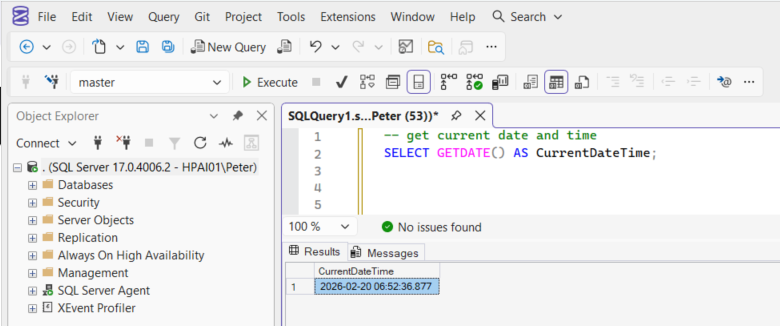
GETDATE() returns the current server date and time as datetime.
- Precision: ~3 milliseconds
- Return type:
datetime
datetime uses rounded fractional seconds and is mainly seen in older schema designs. It stores time in increments of .000, .003, or .007 seconds due to internal rounding behaviour.
It still works. It just should not be your default today.
SYSDATETIME() – Returns datetime2 (Modern Default)
-- get precise current date and time
SELECT SYSDATETIME() AS CurrentDateTime;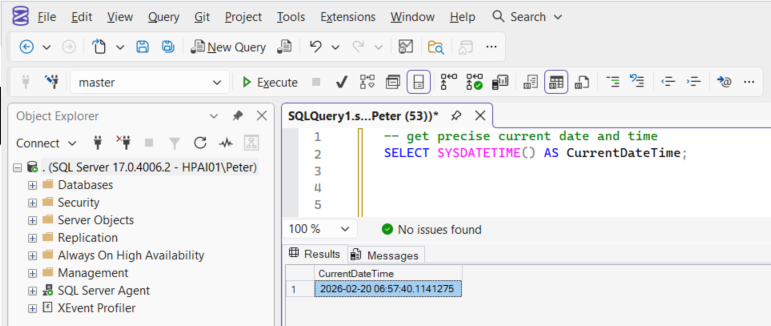
SYSDATETIME() returns the current date and time as datetime2(7).
- Precision: 100 nanoseconds
- Return type:
datetime2(7)
It is preferred because:
datetime2has higher precision- It avoids the rounding behaviour of
datetime - It supports a wider date range
- It aligns with modern schema design
It also allows you to explicitly control fractional precision (for example, datetime2(3) or datetime2(7)).
If you are creating new tables or audit columns, use this.
UTC Variants
If your system spans regions or integrates with cloud services, use UTC.
SELECT GETUTCDATE()     AS CurrentUtcDateTime;
SELECT SYSUTCDATETIME() AS CurrentUtcDateTimeHighPrecision;
These functions still rely on the server’s Windows clock, but return the time converted to Coordinated Universal Time (UTC).
UTC avoids:
- Daylight saving ambiguity (duplicate local timestamps)
- Cross-region confusion
- Log correlation problems across systems
For modern systems, SYSUTCDATETIME() stored in datetime2 is usually the safest default.
UTC standardises how time is represented. It does not change the underlying time source.
Datetime vs Datetime2
| Feature | datetime | datetime2 |
|---|---|---|
| Precision | 3 ms | Up to 100 ns |
| Range | 1753–9999 | 0001–9999 |
| Storage | 8 bytes | 6–8 bytes |
| Rounding | Yes | No |
Key differences:
datetimerounds fractional secondsdatetime2stores exact fractional precisiondatetime2supports a wider rangedatetime2is the modern default
For new schema, use datetime2. There is rarely a reason to introduce datetime today.
Formatting
Formatting should be handled in the application layer where possible.
If you need formatting in T-SQL:
CONVERT() (faster)
SELECT CONVERT(char(10), GETDATE(), 23) AS ISODate; -- yyyy-mm-ddFORMAT() (slower)
SELECT FORMAT(GETDATE(), 'yyyy-MM-dd') AS FormattedDate;FORMAT() is CLR-based and significantly slower. Avoid it in large result sets.
Casting
SELECT CAST(GETDATE() AS date) AS CurrentDateOnly;
SELECT CAST(GETDATE() AS time) AS CurrentTimeOnly;
To standardise precision:
SELECT CAST(SYSDATETIME() AS datetime2(3)) AS CurrentDateTimeMs;Be explicit about precision if you need consistency across systems.
Final Recommendations
GETDATE()→ returnsdatetime(legacy default)SYSDATETIME()→ returnsdatetime2(7)SYSUTCDATETIME()→ safest default for modern systems
For new development:
- Use
SYSUTCDATETIME() - Store values in
datetime2 - Avoid
FORMAT()in high-volume queries - Be explicit about precision
Choose the correct data type at design time. Changing timestamp types later can be a disruptive change.
Leave a Reply