
THREADPOOL is one of the most serious wait types in SQL Server. It means all worker threads are occupied and incoming requests cannot get a thread to execute on. Those requests do not run slowly, they do not run at all. They queue up and wait. If the situation persists, they time out and return errors to the application.
Unlike most waits that represent a query being slow, THREADPOOL represents the entire server being unable to accept new work.
Is This Wait Expected?
No. There is no safe level of THREADPOOL during production operations. Even a small accumulated value in your wait stats means worker thread exhaustion occurred and requests were queued.
If THREADPOOL is currently active (you can see it in sys.dm_os_wait_stats and growing rapidly), treat it as an incident, not a tuning problem.
What Worker Threads Are
SQL Server maintains a pool of worker threads. Each SQL Server scheduler (mapped to a CPU core) can run a fixed number of threads. The total max_workers_count is configured automatically based on CPU count and edition, or set explicitly via sp_configure.
Each active session executing a request needs at least one worker thread. Parallel queries need one per DOP. A session waiting for a lock still holds its thread. A session in the thread pool waiting for something still holds its thread.
When all threads are occupied, the next incoming request hits THREADPOOL and waits.
Root Causes
Blocking consuming threads, the most common cause. Sessions that are blocked waiting for locks (LCK_M_X, LCK_M_S) hold their worker threads while blocked. If a head blocker causes 50 sessions to pile up behind it, those 50 sessions each occupy a thread. On a server with hundreds of blocked sessions, the thread pool can be exhausted entirely. This is why long blocking chains are so dangerous, they do not just slow down the blocked queries, they can exhaust the thread pool and bring the whole server down.
Too many concurrent connections each doing work, connection pooling misconfiguration can create far more concurrent connections than necessary. If each pool sends 50 connections and each connection is actively executing, a server with 50 pools can have 2,500 active requests, which may exceed max worker threads.
High MAXDOP with many concurrent parallel queries, a single parallel query at DOP 8 consumes 8 worker threads. If 50 users all run parallel queries simultaneously, that is 400 threads from parallel queries alone, before accounting for OLTP sessions.
Service Broker activation threads, Service Broker internal activation can create many threads. Misconfigured activation procedures that loop indefinitely can exhaust the thread pool.
Linked server queries, linked server calls create additional threads for the remote connection. Lots of concurrent linked server activity can contribute to thread exhaustion.
How To Diagnose It
Check how close you are to thread exhaustion right now:
SELECT
    SUM(active_workers_count)       AS active_workers,
    SUM(runnable_tasks_count)       AS runnable_tasks,
    si.max_workers_count
FROM sys.dm_os_schedulers s
CROSS JOIN sys.dm_os_sys_info si
WHERE s.status = 'VISIBLE ONLINE'
GROUP BY si.max_workers_count;
If active_workers is within 10–20% of max_workers_count, you are at risk. If they are equal, you are in a THREADPOOL situation right now.
Find what sessions are doing:
SELECT
    r.status,
    COUNT(*)                        AS session_count
FROM sys.dm_exec_requests r
GROUP BY r.status
ORDER BY session_count DESC;
A large count of suspended sessions, especially with blocking_session_id > 0, means blocking is the cause. A large count of running or runnable sessions means actual concurrent load is the cause.
Count blocked sessions:
SELECT COUNT(*) AS blocked_sessions
FROM sys.dm_exec_requests
WHERE blocking_session_id > 0;
More than 20–30 blocked sessions on a typical server is a strong signal that blocking is the thread pool driver.
Find the head blocker:
.\run.ps1 Get-BlockingSummary
Check max workers configuration:
SELECT name, value_in_use, description
FROM sys.configurations
WHERE name = 'max worker threads';
value_in_use = 0 means SQL Server auto-configures. Check max_workers_count from sys.dm_os_sys_info to see the computed limit.
What To Do
If it is happening right now, stop the bleeding first:
- Find the head blocker causing the blocking chain and kill it:
KILL [session_id]; -- the head blocker session
This releases all blocked sessions, which release their threads. Do not kill random sessions, find the head blocker first.
- If it is not a blocking problem but a load problem: identify the application sending the most concurrent requests and throttle it at the connection pool level while you investigate.
Fix the underlying causes:
For blocking-driven THREADPOOL:
- Investigate and fix the blocking root cause (see
LCK_M_Xpost) - Enable RCSI to eliminate reader/writer lock conflicts
- Shorten transaction scope in applications
For connection pool over-provisioning:
- Reduce max pool size in application connection strings
- Review whether all connections are necessary, idle pooled connections do not consume threads, but active connections do
- Set connection timeouts so stale connections fail fast
For high-MAXDOP parallel queries:
- Reduce
max degree of parallelism - Raise cost threshold for parallelism to prevent trivial queries going parallel
- Use Resource Governor to limit DOP per workload group
Raising max worker threads, this is a last resort, not a first response. If you raise the limit without fixing the root cause, you just move the ceiling:
EXEC sp_configure 'max worker threads', 2048;
RECONFIGURE;
The default auto-configuration is usually appropriate. Raising it makes sense only if you have verified the workload genuinely needs more threads and the root causes (blocking, pool misconfiguration) have been addressed.
Related Scripts
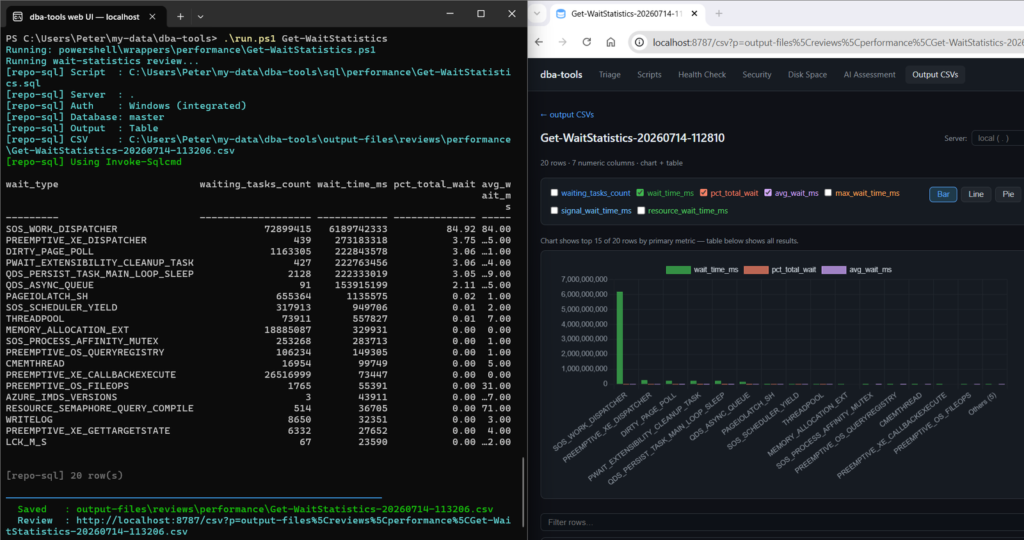
Get-WaitStatistics, the overview script; THREADPOOL appearing here means it already happenedGet-BlockingSummary, first thing to check when THREADPOOL is activeGet-WorkerThreadsAndActiveSessions, thread pool utilisation and active session breakdown- SQL Server High CPU, the symptom router: start here when CPU is pinned
- SQL Server Agent Jobs Queued on Maximum User Working Threads, the Agent limit with almost the same name: jobs queued with [398] are not engine worker threads, and raising max worker threads will not help
Leave a Reply