
Adding columns to tables in SQL Server is a routine task, but it is not always a harmless one.
On small tables it is trivial. On large or business-critical tables — especially those involved in replication or heavy write workloads — it can introduce blocking, transaction log growth, or downstream latency if handled carelessly.
This post walks through how to add columns safely using ALTER TABLE, what to watch out for, and when a “simple change” deserves more planning.
When Adding Columns Needs Extra Care
You should slow down and think before running ALTER TABLE if:
- The table is large or heavily written to
- The table participates in replication
- You are adding a column with a default value
- The change is being made during business hours
Schema changes are fast to type and slow to undo.
Add a Column to a Table in SQL Server
The basic syntax for adding a column is straightforward.
USE WatchtowerMetrics;
GO

ALTER TABLE dbo.DatabaseBackupHistory
ADD BackupSource sysname NULL;
GO
This is the safest form of add-column operation and is what you should aim for by default.
Existing rows are unaffected, no data is rewritten, and the operation is typically metadata-only. This is the safest form of add-column operation and is what you should aim for by default.
Verifying the Column Exists
After any schema change, always verify it explicitly.
For a fast and familiar check, sp_help is usually enough:
EXEC sp_help 'dbo.DatabaseBackupHistory';
GO
This confirms that the column exists, its data type, nullability, and whether any defaults or constraints were created.
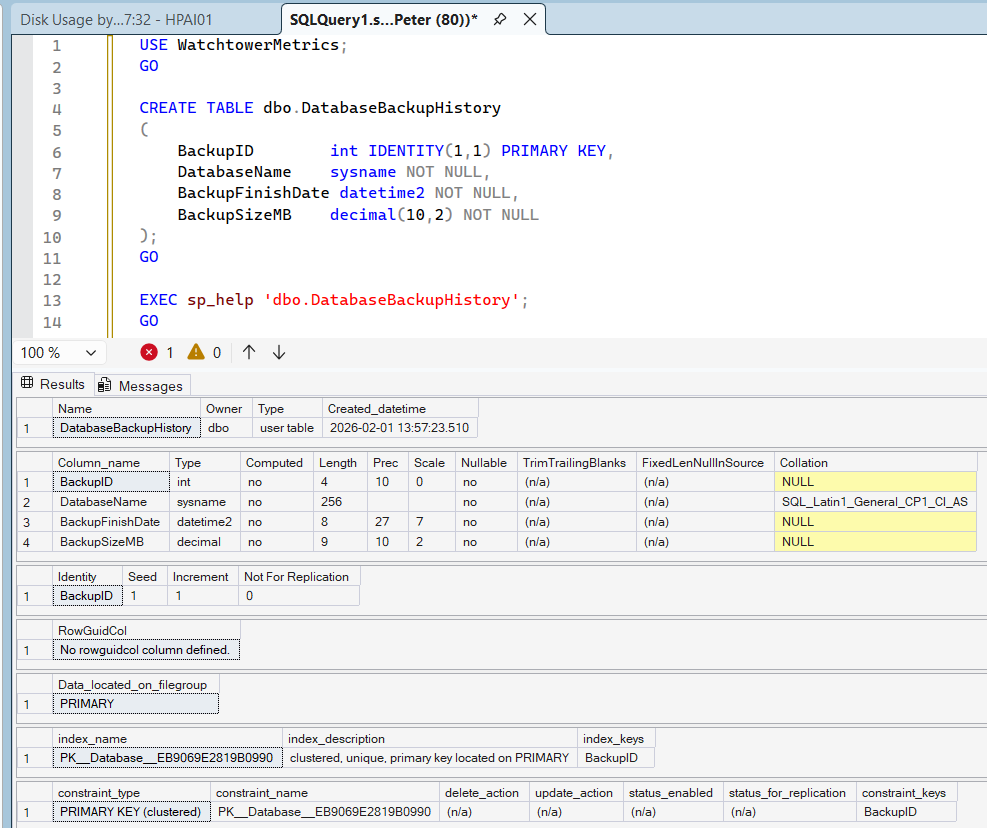
If you prefer querying metadata directly (for scripting or automation), sys.columns provides the same information without touching table data.
Adding a Column with a Default Value
This is where most problems begin.
When you add a column with a default value and WITH VALUES, SQL Server must update every existing row.
ALTER TABLE dbo.DatabaseBackupHistory
ADD BackupType varchar(20)
    CONSTRAINT DF_DatabaseBackupHistory_BackupType
    DEFAULT 'FULL'
    WITH VALUES;
GO
This operation rewrites every row in the table, generates transaction log activity, can block concurrent queries, and can introduce replication latency. On large tables, it can take minutes or hours.
Safer Pattern for Large or Busy Tables
For large or high-traffic tables, split the change into phases. Add the column without a default, backfill data in controlled batches, then add the default constraint afterward.
This keeps the schema change fast and gives you control over workload impact instead of letting SQL Server do it all at once.
Replication Considerations
If the table participates in SQL Server Replication:
- Schema changes usually propagate automatically
- Default values can significantly increase replication latency
- Large updates increase pressure on the distributor
Before making the change, confirm schema changes are allowed, monitor Replication Monitor during execution, and be cautious with defaults on large articles.
👉 Microsoft Docs: Considerations for Schema Changes
👉 Microsoft Docs: Replicate Schema Changes
Dropping a Column
Removing a column also uses ALTER TABLE.
ALTER TABLE dbo.DatabaseBackupHistory
DROP COLUMN BackupSource;
GO
Dropping a column permanently removes data and cannot be undone without a restore. In replicated environments, the change propagates downstream.
After dropping a column, you can again use sp_help to confirm the table structure has changed as expected.
👉 Microsoft Docs: ALTER TABLE (Transact-SQL)
Treat column drops with the same care as any data-destructive operation.
Practical DBA Checklist
Before adding a column to a business-critical table:
- Check table size and write activity
- Avoid defaults on large tables where possible
- Confirm replication behaviour
- Schedule during low-usage windows
- Verify after execution
Most incidents come from assuming the change is “instant”.
Final Thoughts
Adding columns in SQL Server is easy.
Adding them safely, on the right schedule, and without unintended side effects is what separates routine changes from production incidents.
Use metadata-only changes where possible, be deliberate with defaults, and always consider what sits downstream of the table you are changing.
Leave a Reply