
Checking the last backup times is one of the first things to do when reviewing a SQL Server instance.
Before making changes, running maintenance, or troubleshooting issues, you need to know whether reliable recovery points actually exist.
This post shows a fast, reliable way to check the most recent full, differential, and transaction log backups across an instance, followed by an optional deeper query when you need more than a simple pass or fail.
Why Checking Backup Times Matters
Backups are easy to assume and expensive to forget.
Common situations where this check matters:
- Taking ownership of a new or inherited instance
- Investigating recovery options during an incident
- Verifying backup jobs after changes or failures
- Confirming backup coverage before maintenance
If a database has no recent full backup, everything else is a secondary priority for a DBA.
Show Last Backup Times for All Databases
This query returns the most recent full, differential, and log backups for each database.
It is designed for fast validation, not auditing or compliance reporting.
-- Show last backups on all databases
DECLARE @DaysBack int = 30;

SELECT
    ISNULL(d.name, bs.database_name) AS [Database],
    d.recovery_model_desc AS [Recovery Model],
    MAX(CASE WHEN bs.type = 'D' THEN bs.backup_finish_date END) AS [Last Full Backup],
    MAX(CASE WHEN bs.type = 'I' THEN bs.backup_finish_date END) AS [Last Differential Backup],
    MAX(CASE WHEN bs.type = 'L' THEN bs.backup_finish_date END) AS [Last Log Backup]
FROM sys.databases AS d
LEFT JOIN msdb.dbo.backupset AS bs
    ON bs.database_name = d.name
   AND bs.backup_finish_date >= DATEADD(DAY, -@DaysBack, GETDATE())
WHERE d.name <> N'tempdb'
GROUP BY ISNULL(d.name, bs.database_name), d.recovery_model_desc, d.name
ORDER BY d.recovery_model_desc, d.name
OPTION (RECOMPILE);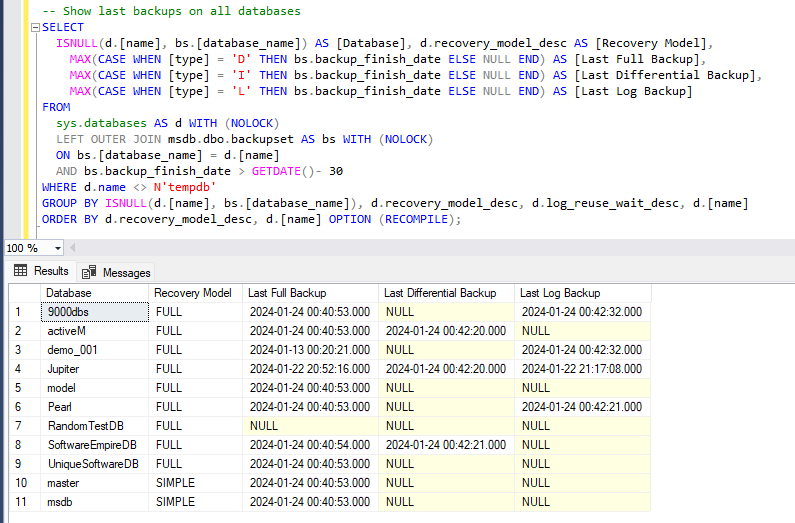
This query immediately highlights:
- Databases with no recent full backup
- Missing log backups in full recovery
- Gaps that would prevent point-in-time recovery
Any NULL result should be treated as actionable, not informational.
Interpreting the Results
A few practical points when reviewing the output:
- Full recovery without log backups is a problem
- Differential backups are only useful if a valid full backup exists
- Recent backups do not guarantee recoverability. They only indicate potential.
If you are also troubleshooting log growth or retention issues, these posts pair naturally with backup checks:
👉 How to Check Transaction Log Space Usage in SQL Server
👉 Applying Data Retention Safely in SQL Server
👉 Microsoft Docs: Backup & Restore Overview (SQL Server)
Optional: Detailed Backup History
When you need more detail, such as auditing backup behaviour or troubleshooting broken backup chains, you can query full backup history from system tables.
This example returns backup type, size, device information, and timing for the last two months.
-- Get detailed database backup history (last N months)
DECLARE @MonthsBack int = 2;

SELECT
    bs.server_name,
    bs.database_name,
    bs.user_name,
    bms.software_name AS backup_software,
    bs.recovery_model,
    CASE
        WHEN bs.type = 'D' AND bs.is_copy_only = 0 THEN 'FULL'
        WHEN bs.type = 'D' AND bs.is_copy_only = 1 THEN 'FULL (Copy Only)'
        WHEN bs.type = 'I' THEN 'DIFF'
        WHEN bs.type = 'L' THEN 'LOG'
    END AS backup_type,
    bs.backup_start_date,
    bs.backup_finish_date,
    bf.physical_device_name,
    CASE bf.device_type
        WHEN 2 THEN 'Disk'
        WHEN 5 THEN 'Tape'
        WHEN 7 THEN 'Virtual device'
        WHEN 9 THEN 'Azure Storage'
        WHEN 105 THEN 'Permanent device'
        ELSE 'Other'
    END AS device_type,
    CONVERT(decimal(10,2), bs.backup_size / 1024.0 / 1024.0) AS backup_size_mb,
    CONVERT(decimal(10,2), bs.compressed_backup_size / 1024.0 / 1024.0) AS compressed_backup_size_mb,
    -- Optional GB values
    -- CONVERT(decimal(10,2), bs.backup_size / 1024.0 / 1024.0 / 1024.0) AS backup_size_gb,
    -- CONVERT(decimal(10,2), bs.compressed_backup_size / 1024.0 / 1024.0 / 1024.0) AS compressed_backup_size_gb,
    bs.database_backup_lsn,
    bs.checkpoint_lsn,
    bs.begins_log_chain,
    bms.is_password_protected
FROM msdb.dbo.backupset bs
JOIN msdb.dbo.backupmediaset bms
    ON bs.media_set_id = bms.media_set_id
LEFT JOIN msdb.dbo.backupmediafamily bf
    ON bs.media_set_id = bf.media_set_id
WHERE bs.backup_start_date >= DATEADD(MONTH, -@MonthsBack, sysdatetime())
ORDER BY
    bs.database_name,
    bs.backup_finish_date DESC;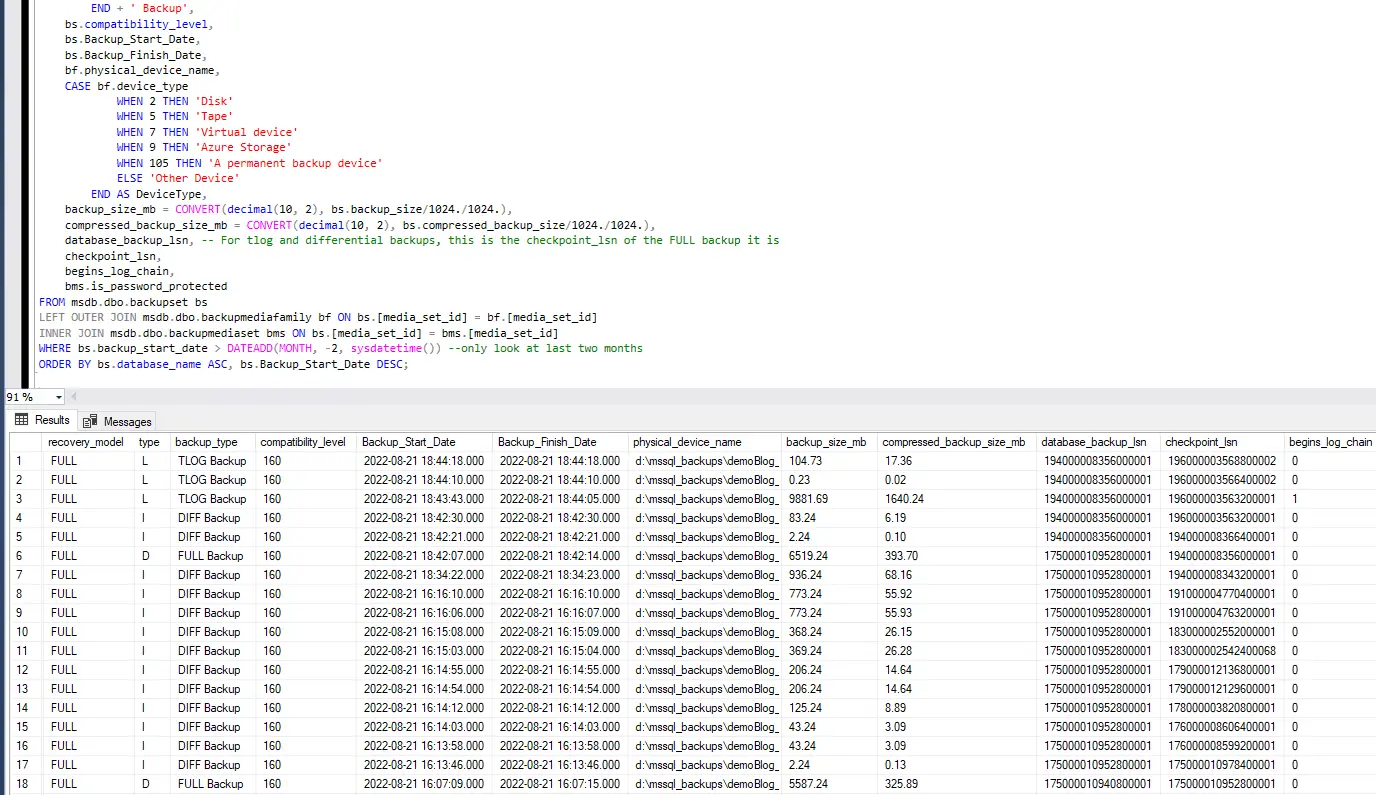
This level of detail is useful when auditing backup tooling, identifying copy-only interference, or diagnosing broken chains. For routine DBA checks, the first query is usually sufficient.
Final Thoughts
Backup checks are not something you do once.
They are a quick signal that tells you whether recovery is possible before you find out the hard way.
A simple “last backup times” query catches most problems early and should be part of every DBA’s baseline health checks.
Leave a Reply