
When a database backup or restore is running, one of the first questions is simple:
How long does it have left?
SQL Server exposes estimated completion information for active backup and restore operations. You can query it directly to see progress, elapsed time, and an approximate finish time without guessing or relying on external tooling.
This post shows a simple, reliable way to surface that information using system DMVs.
When This Is Useful
You typically run this when:
- A backup or restore is taking longer than expected
- You are waiting to bring a database online
- A maintenance window is tight
- Someone is asking for an ETA during an incident
This query works only while the operation is actively running.
Estimate Backup and Restore Completion Time
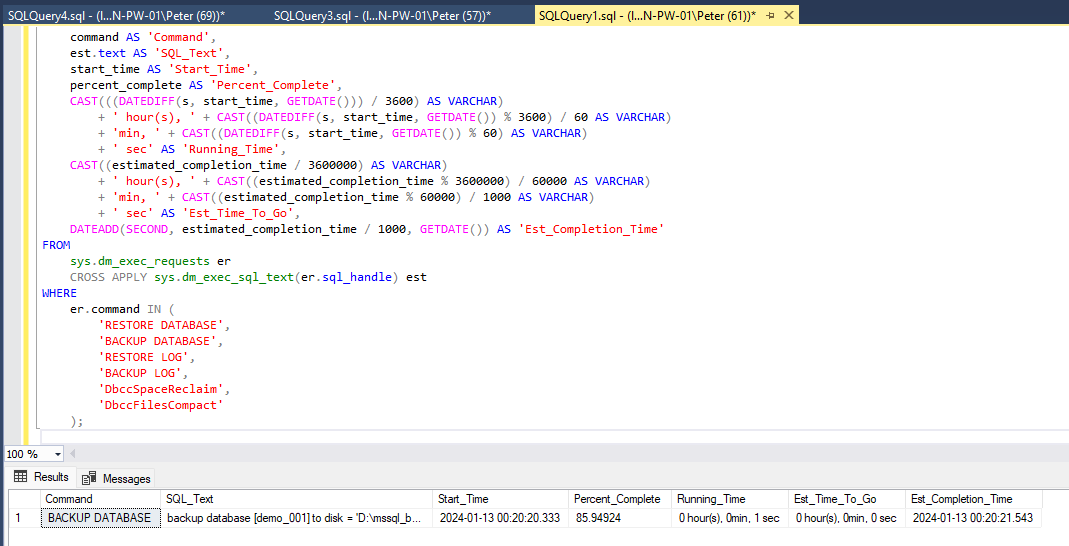
Run the query below to see progress and estimated completion time for active backup and restore operations.
How to Read the Output
Key columns to watch:
- percent_complete
Current progress of the operation. - running_time
How long the operation has been running so far. - estimated_time_remaining
SQL Server’s best estimate of time left. - estimated_completion_time
Approximate finish time based on current progress.
These values are estimates, not guarantees.
Important Notes
A few things to keep in mind:
- Estimates can change as workload or I/O conditions change
- Percent complete may stall for periods of time
- Very early in an operation, estimates can be inaccurate
- This only shows operations that are currently running
If nothing is returned, there is no active backup or restore.
Related Checks
This query is often used alongside:
👉 Get Last Database Backup Times in SQL Server
👉 Get Last Database Restore Date and Time in SQL Server
👉 Kill All User Sessions on a Database in SQL Server
Together, these cover most backup and restore workflows.
Final Thoughts
This query is not about optimisation or tuning. It is about visibility.
When a backup or restore is running, knowing how long it has left helps you plan, communicate clearly during incidents, and avoid guesswork under pressure.
It’s a small script, but one that earns its place in a DBA’s everyday toolkit.
Leave a Reply