
When you need to drop, restore, or change database settings, active user sessions often get in the way.
SQL Server will block these operations until all connections are cleared. In busy environments, waiting is rarely practical.
This post shows a safe, deliberate, and review-first way to identify and kill all user sessions connected to a specific database.
When This Is Necessary
You typically need to do this when:
- Dropping a database
- Restoring over an existing database
- Bringing a database out of restoring or recovery state
- Changing database options
- Clearing abandoned application connections
This is a disruptive action. Use it intentionally and with awareness of impact.
Kill All User Sessions on a Database
The script below identifies all user sessions connected to a specific database and generates KILL commands for review before execution.
It uses modern DMVs, excludes your own session, and does not execute anything unless you explicitly allow it. It operates at the instance level but targets sessions for a single database only.
USE master;
GO

DECLARE @DatabaseName sysname = N'DATABASE123'; -- change database name
DECLARE @KillCommands nvarchar(max) = N'';

SELECT
    @KillCommands = @KillCommands +
        N'KILL ' + CONVERT(nvarchar(10), s.session_id) + N';' + CHAR(13)
FROM sys.dm_exec_sessions s
WHERE s.database_id = DB_ID(@DatabaseName)
  AND s.session_id <> @@SPID
  AND s.is_user_process = 1;

PRINT @KillCommands;
-- EXEC sp_executesql @KillCommands; -- uncomment only after review
This script:
- Targets user sessions only
- Excludes your current connection
- Prints commands before execution
- Avoids deprecated objects
Only uncomment execution when you are confident the impact is acceptable.
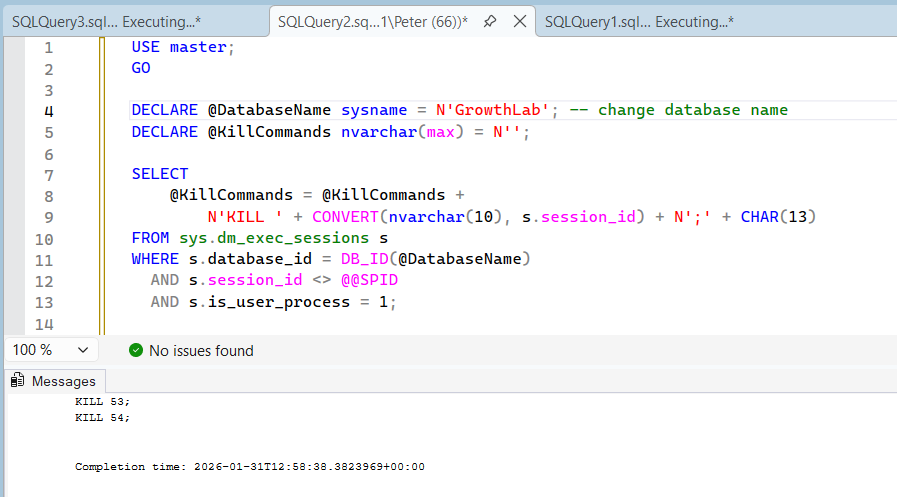
This example shows active user sessions connected to a database before generating KILL commands.
Review Before Executing
Always review the printed output first.
You should verify:
- Only the intended database is targeted
- No critical system or maintenance sessions are included
- You understand which applications will be disconnected
Only uncomment execution when you are confident the impact is acceptable.
Important Considerations
A few things that regularly catch people out:
- Killing sessions rolls back open transactions
- Applications may immediately reconnect
- Long-running transactions can take time to unwind
- This requires sysadmin or equivalent permissions
If sessions reappear immediately, the application, service, or job reconnecting must be stopped first.
In some scenarios, ALTER DATABASE … SET SINGLE_USER WITH ROLLBACK IMMEDIATE may be a more appropriate approach, depending on intent.
Common Follow-Ups
This script is often used alongside:
Database Cannot Be Opened – It Is in the Middle of a Restore
Get Last Database Restore Date and Time in SQL Server
Get Last Database Backup Times in SQL Server
Together, these cover most restore and recovery workflows.
Final Thoughts
Killing user sessions is not complicated, but it is powerful.
Used carefully, it clears the path for restores and maintenance. Used casually, it creates avoidable disruption.
Treat it as a controlled operational step, not a shortcut.
Clearing every session is usually done to get exclusive access. These cover what happens either side of that.
- Get Active Connections by Database, see who is connected before you disconnect anyone.
- How to Kill a SPID in SQL Server, when it is one session rather than all of them.
- The Database Is in Single User Mode (Fix), the state this can leave you in, and the way back out.
Leave a Reply