
You may see the following error when attempting to access a database during or after a restore operation:
Database “[DatabaseName]” cannot be opened. It is in the middle of a restore.
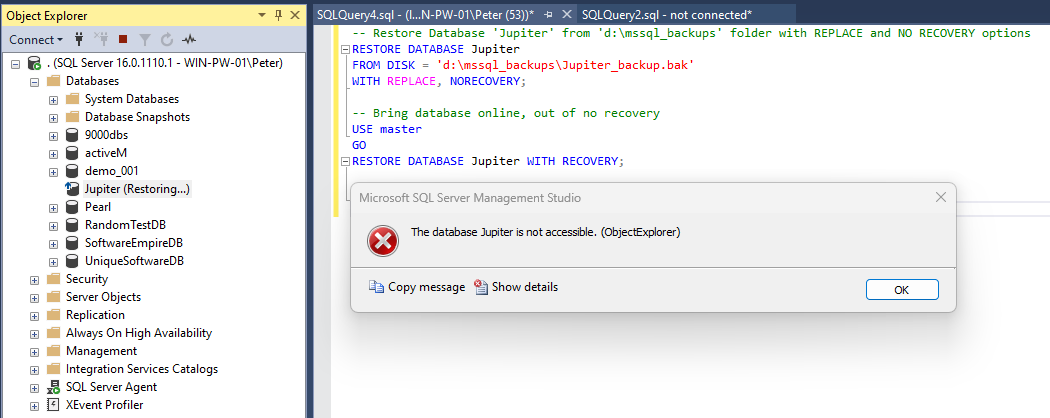
This message is easy to misinterpret, especially during incidents or maintenance windows.
It does not indicate corruption or failure by itself.
This error means the database is currently in the RESTORING state.
While in this state, most operations fail, including queries, schema changes, and drops. The database is not accessible until the restore process is completed or explicitly recovered.
Why This Error Occurs
A database is typically in the RESTORING state because:
- A restore operation is still running
- A restore was started with NORECOVERY and not completed
- A previous restore failed and left the database waiting for additional restore steps
In all cases, SQL Server is protecting the database until recovery is finalised.
Bring the Database Online
If no further restore steps are required, you can bring the database online by completing recovery.
USE master;
GO

RESTORE DATABASE [DatabaseName] WITH RECOVERY;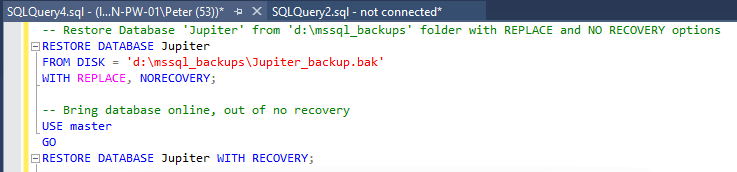
This finalises the restore process and transitions the database to the ONLINE state.
Once recovery completes, normal operations are allowed.
When This Is Not the Right Fix
Do not run recovery if:
- You are in the middle of a restore sequence
- Additional log restores are still required
- You intentionally restored using NORECOVERY
Running WITH RECOVERY permanently ends the restore chain. Once executed, you cannot apply additional backups.
Common Follow-Up Scenarios
Dropping the Database
If you encountered this error while trying to drop the database, complete recovery first. Once the database is online, you can proceed with the drop.
If the drop still fails, active sessions may be blocking it.
👉 Kill All User Sessions on a Database in SQL Server
Restore Is Still Running
If the restore is genuinely in progress, recovery will fail until it completes.
👉 Estimate Backup and Restore Completion Time in SQL Server
Important Notes
A few points worth keeping in mind:
- Databases created manually may never show restore activity
- Restore history can be cleared if system databases are rebuilt
- This error does not indicate corruption by itself
- The state is expected behaviour during restore workflows
The mistake is usually impatience, not configuration.
Related Checks
Restore issues usually go hand-in-hand with backup validation.
👉 Get Last Database Restore Date and Time in SQL Server
👉 Get Last Database Backup Times in SQL Server
Final Thoughts
This error looks alarming, but it is rarely the real problem.
It almost always means SQL Server is waiting for you to either:
- Finish the restore sequence
- Or explicitly bring the database online
Understanding when to recover and when to wait avoids broken restore chains and unnecessary downtime. This is a simple fix, but timing matters.
Leave a Reply